Why now
Nextcloud 35, Hub 26 Summer, came out on 16 September. I went through what it brings in What’s new in Nextcloud 35, and promised there to upgrade our own server in November. I didn’t want to be among the first: the early 35.0.x releases had database problems, and I waited for 35.0.2 with the fixes. By the time I got to it, 35.0.3 was out, from 12 November, and that’s the version Nextcloud’s November notice recommends [1].
Nextcloud can’t skip major versions, and the safe way from 34 to 35 is through the newest 34 first [2]. So the plan had two steps: 34.0.2 to 34.0.6, then 34.0.6 to 35.0.3, with a backup before each.
It didn’t go to plan on the calendar. I took the backup on Sunday evening, then a security incident at work took Monday, and the upgrade itself happened on Wednesday afternoon. The whole upgrade, both steps, took under two hours, and most of that was me reading output and taking screenshots.
Our setup
Our Nextcloud runs in Docker inside an LXC container, CT 1001, on phoebe, the main server from My hypervisors in 2026. It’s one hand-written docker-compose.yaml with four containers:
nextcloud:…-fpm-alpine, Nextcloud itself with PHP-FPMmariadb:10.11, the databaseredis:alpine, a cache that doesn’t write anything to disknginx:alpine, the web server in front
The data doesn’t live inside the container. Four ZFS datasets on phoebe are mounted into it: the Nextcloud program files, the database, the Redis cache and the user files, which are the big one, about 420 GB on the hard-drive pool. Sanoid snapshots them every hour, and stephen pulls copies of the snapshots (3-2-1 in practice). Because the datasets are mounted in by hand instead of being Proxmox volumes, Proxmox’s own backup doesn’t include them, which I wrote about in Backup of VMs and containers in Proxmox. For an upgrade, that means the ZFS snapshots are the backup.
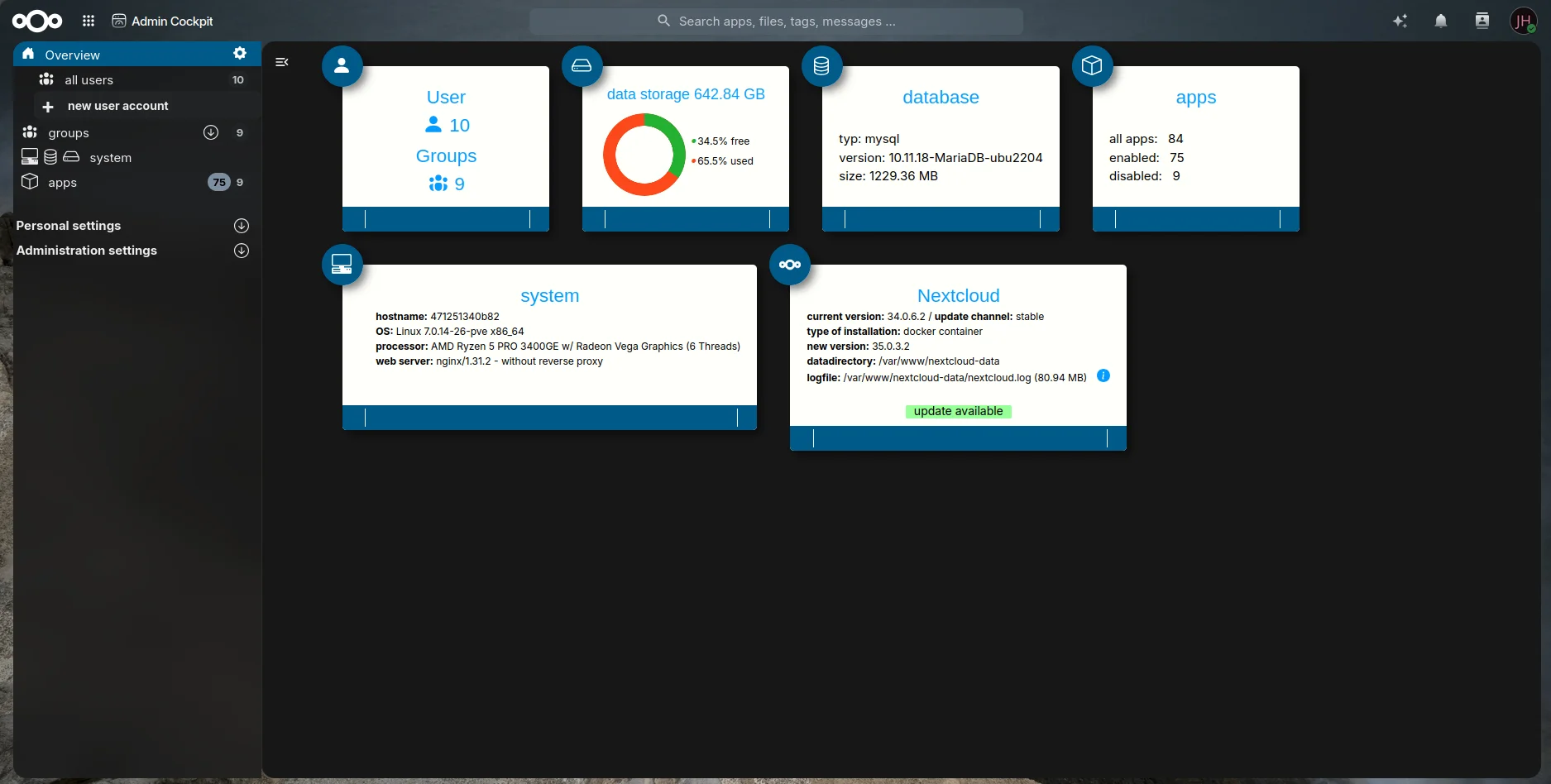
In numbers: 10 users, 643 GB of data, a 1.2 GB database and 75 apps switched on. MariaDB 10.11 is still supported by 35, so the database could stay as it was [4].
Before the upgrade: the backup
The backup has to be a moment where everything is consistent: the files, the database and the program files from the same second. The simplest way to get that is to stop everything.
# inside CT 1001
docker exec -u www-data nextcloud-stack_app_1 php occ maintenance:mode --on

# on phoebe
pct shutdown 1001
SNAP=before-nc35
zfs snapshot rpool/data/vmdatanvme/nextcloud-app-core@$SNAP \
             rpool/data/vmdatanvme/nextcloud-db@$SNAP \
             rpool/data/vmdatanvme/nextcloud-redis-cache@$SNAP \
             rpool/data/vmdatanvme/subvol-1001-disk-0@$SNAP
zfs snapshot paula/data/vmdatahdd/nextcloud-userdata@$SNAP
Two zfs snapshot commands, because the user files are on another pool, and one command can’t cover two pools. pct snapshot 1001 would have been shorter, but it only snapshots the container’s own disk and skips the mounted datasets, which is everything that matters. Then I waited for the next pull and checked that the snapshots had reached stephen before I touched anything.
zfs list -t snapshot showed every one of them as 0B used. That looks alarming, but it isn’t: “used” only counts blocks that belong to that snapshot alone, and sanoid’s hourly snapshots on either side share the same blocks.
The plan also had a database dump, taken with mariadb-dump before the shutdown. A dump doesn’t depend on ZFS and can be restored into any MariaDB. On Wednesday, I checked for it, and the file wasn’t there. The command had never run on Sunday. Nextcloud had been in maintenance mode the whole time, so I took it on Wednesday, with the same data, 825 MB. The snapshots would have been enough, but the lesson stands: check that a backup exists before you rely on it.
Reading the warnings first
Before changing anything, I took Nextcloud out of maintenance mode and read Administration settings → Overview.
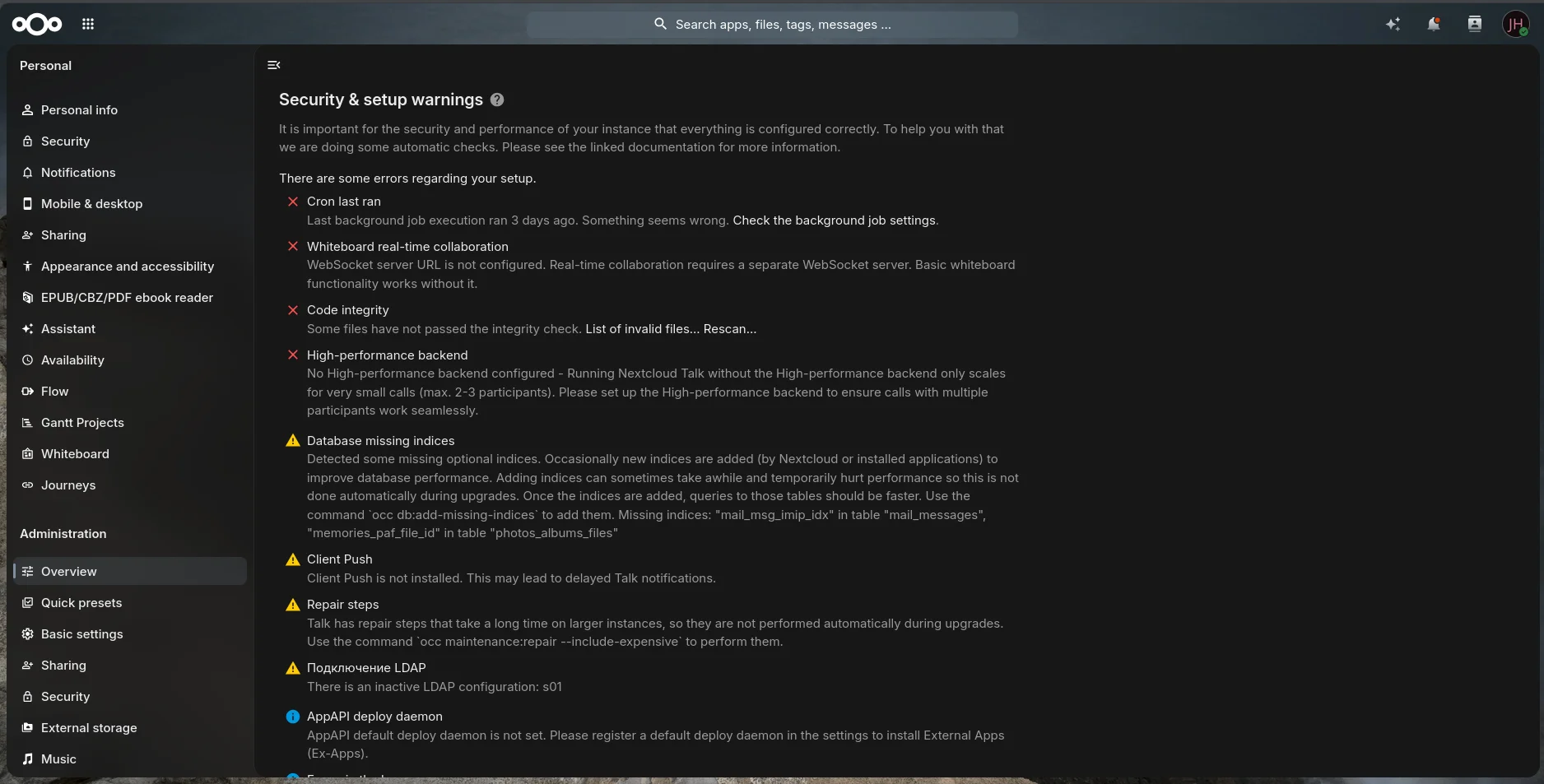
Most of it was old news. Cron had last run three days earlier because background jobs don’t run in maintenance mode. Whiteboard, Talk’s high-performance backend, Client Push and the AppAPI daemon are optional extras I haven’t set up. The inactive LDAP configuration is a leftover, and its heading, “Подключение LDAP”, is in Russian for reasons I can’t explain. The missing indices and the Talk repair steps are fixed by commands after the upgrade.
The one that needed a look was Code integrity: “Some files have not passed the integrity check.” That sounds like someone has tampered with the server. The list of files told a different story: twelve files named core.2379, core.5262 and so on, in Nextcloud’s web folder. They’re core dumps, the memory image a process leaves behind when it crashes, here PHP. Eight were from the first half of August, three from one evening in September and one from October. 1.6 GB on paper, 468 MB on disk after ZFS compression, and part of every snapshot since. I deleted them, and occ integrity:check-core came back clean.
The compose file had one more surprise. Nextcloud’s image was nextcloud:34.0-fpm-alpine, a tag that means “the newest 34.0.x”, so the file didn’t say which version was running. Newer images of MariaDB, Redis and nginx had also been downloaded at some point, but never put into use. A plain docker-compose up -d could have changed all four at once. So I pinned Nextcloud to an exact version, upgraded only that container, and cleaned out the old images:
cd /opt/nextcloud-stack
docker image prune -a
sed -i 's|image: nextcloud:34.0-fpm-alpine|image: nextcloud:34.0.6-fpm-alpine|' docker-compose.yaml
docker image prune -a freed 4.75 GB, images of Nextcloud 32, 33 and older 34s, on a container disk of 15 GB.
Step 1: the newest 34
With the official Docker image, the upgrade is a new image. When the container starts, its start script compares the installed version with the image’s, copies in the new program files and runs Nextcloud’s upgrade: in the log below, “Upgrading nextcloud from 34.0.2.1”. The “Open updater” button on the admin page is the web updater for ordinary installs. For Docker, Nextcloud’s manual says to follow the instructions for that installation method [2], and for the image that means pulling a new one [3].
docker-compose pull app
docker-compose up -d --no-deps app
docker logs -f nextcloud-stack_app_1
--no-deps recreates only the Nextcloud container and leaves the database, Redis and nginx alone. The log:
Initializing nextcloud 34.0.6.2 ...
Upgrading nextcloud from 34.0.2.1 ...
Turned on maintenance mode
Updating database schema
Updated database
Updating <dav> ...
...
Repair warning: ffmpeg binary could not be configured
Starting code integrity check...
Finished code integrity check
Update successful
Turned off maintenance mode
About a minute. The ffmpeg warning is old: the image doesn’t include ffmpeg, which the Memories app would like. Within ten seconds, the desktop clients were syncing again. docker logs -f keeps following the log until you press Ctrl+C, so “it’s still running” just means the log is.
Then the leftovers:
docker exec -u www-data nextcloud-stack_app_1 php occ db:add-missing-indices
docker exec -u www-data nextcloud-stack_app_1 php occ app:update --all
db:add-missing-indices added four indices: the two the overview had listed and two more that came with 34.0.6. app:update --all found nothing, because the four app updates waiting on 34.0.2 had been installed by the upgrade.
The overview on 34.0.6 now offered 35.0.3, with one warning:
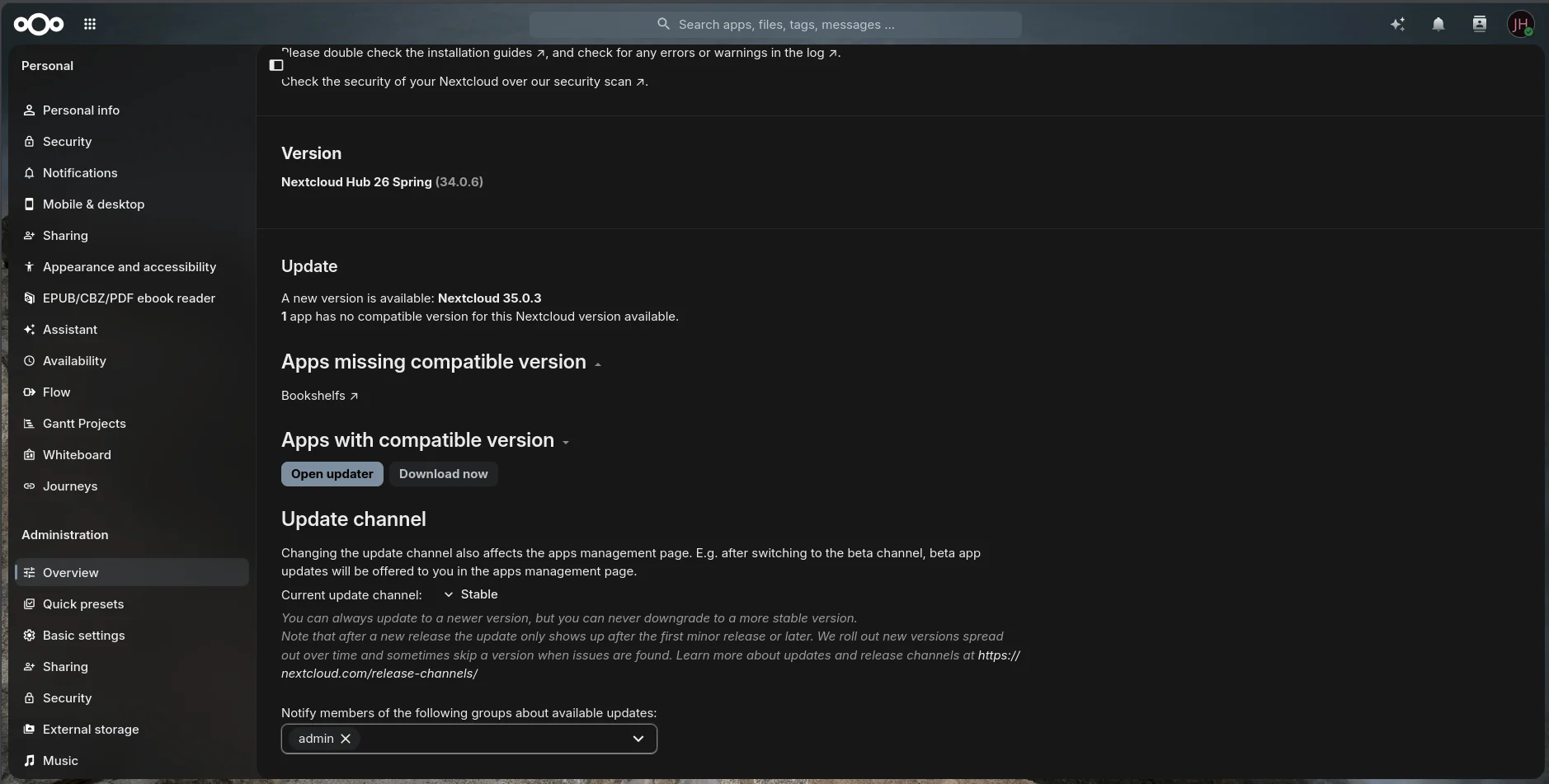
Bookshelfs had no version for 35. That’s the list to read before a major upgrade: an app on it will be switched off, and stays off until its author catches up. Bookshelfs isn’t something we depend on, so it could go.
Before the big step, I took a second set of snapshots, @after-34x, the same way as the first. If 35 went wrong, I’d only have to go back to 34.0.6, not start over.
Step 2: 35
My first try at step 2 did nothing at all: I was in /root, not in the folder with the compose file, and sed, grep and docker-compose all complained that they couldn’t find it. docker logs -f then happily replayed the old log from step 1, which looked like an upgrade for a confusing moment. cd first.
cd /opt/nextcloud-stack
sed -i 's|image: nextcloud:34.0.6-fpm-alpine|image: nextcloud:35.0.3-fpm-alpine|' docker-compose.yaml
docker-compose pull app
docker-compose up -d --no-deps app
docker logs -f nextcloud-stack_app_1
This log was longer, and it starts with a fright:
Upgrading nextcloud from 34.0.6.2 ...
Updating database schema
Updated database
Disabled incompatible app: admincockpit
Disabled incompatible app: assistant
Disabled incompatible app: bookshelfs
Disabled incompatible app: calendar
Disabled incompatible app: contacts
...
Disabled incompatible app: spreed
Disabled incompatible app: whiteboard
28 apps switched off, among them Calendar, Contacts, Mail, Talk (spreed), Deck, Nextcloud Office and Team Folders. That’s how a major upgrade works: every app whose installed version doesn’t say it supports 35 is switched off first, and then Nextcloud fetches new versions from the app store. Then came Nextcloud’s own apps, nearly all of them jumping to a new major version: Files 3.0.0, Photos 8.0.0, Activity 8.0.0 and so on. The end of the log:
Update successful
Turned off maintenance mode
The database schema does not match what is expected for the installed version:
  - oc_group_folders: unexpected index 'gf_folders_folder_id'
The following apps have been disabled:
bookshelfs
Only Bookshelfs in the final list. occ app:list --disabled confirmed it: the other 27 were back on their 35 versions. The upgrade itself took about a minute again.
What happened to the database and Talk
The schema warning is new in 35: after upgrading, Nextcloud now compares the database with what each app expects, and occ db:schema:check -v shows the details. On our server it found three kinds of thing:
- Team Folders has an index it doesn’t expect. The app works. I’ve left it for now; if a later Team Folders update doesn’t sort it out, I’ll look closer.
- The Text app is missing three columns and an index. It was switched off here, and the check says what’s missing is added when it’s switched on again. I’ve since switched it back on.
- About 105 tables from apps I removed long ago: Analytics, Appointments, Cookbook, Face Recognition, News, Guests and about 60 tables starting with
done_. The check explains it itself: “occ app:remove only deletes its code, not its tables or config.” Cleaning those out is a job for another day, after a dump.
Then the commands that finish a major upgrade:
docker exec -u www-data nextcloud-stack_app_1 php occ db:add-missing-indices
docker exec -u www-data nextcloud-stack_app_1 php occ db:add-missing-columns
docker exec -u www-data nextcloud-stack_app_1 php occ db:add-missing-primary-keys
docker exec -u www-data nextcloud-stack_app_1 php occ maintenance:repair --include-expensive
One more index, for notifications, and nothing missing beyond it. maintenance:repair --include-expensive runs the repair steps that are too slow to run during the upgrade itself, Talk’s among them. On a server with ten users, all four commands took 38 seconds together. Talk regenerated its signalling keys, 297 tags were checked, five birthday calendars were fixed, and there were no errors. The database problems that made me wait for 35.0.2 didn’t show up at all.
Afterwards
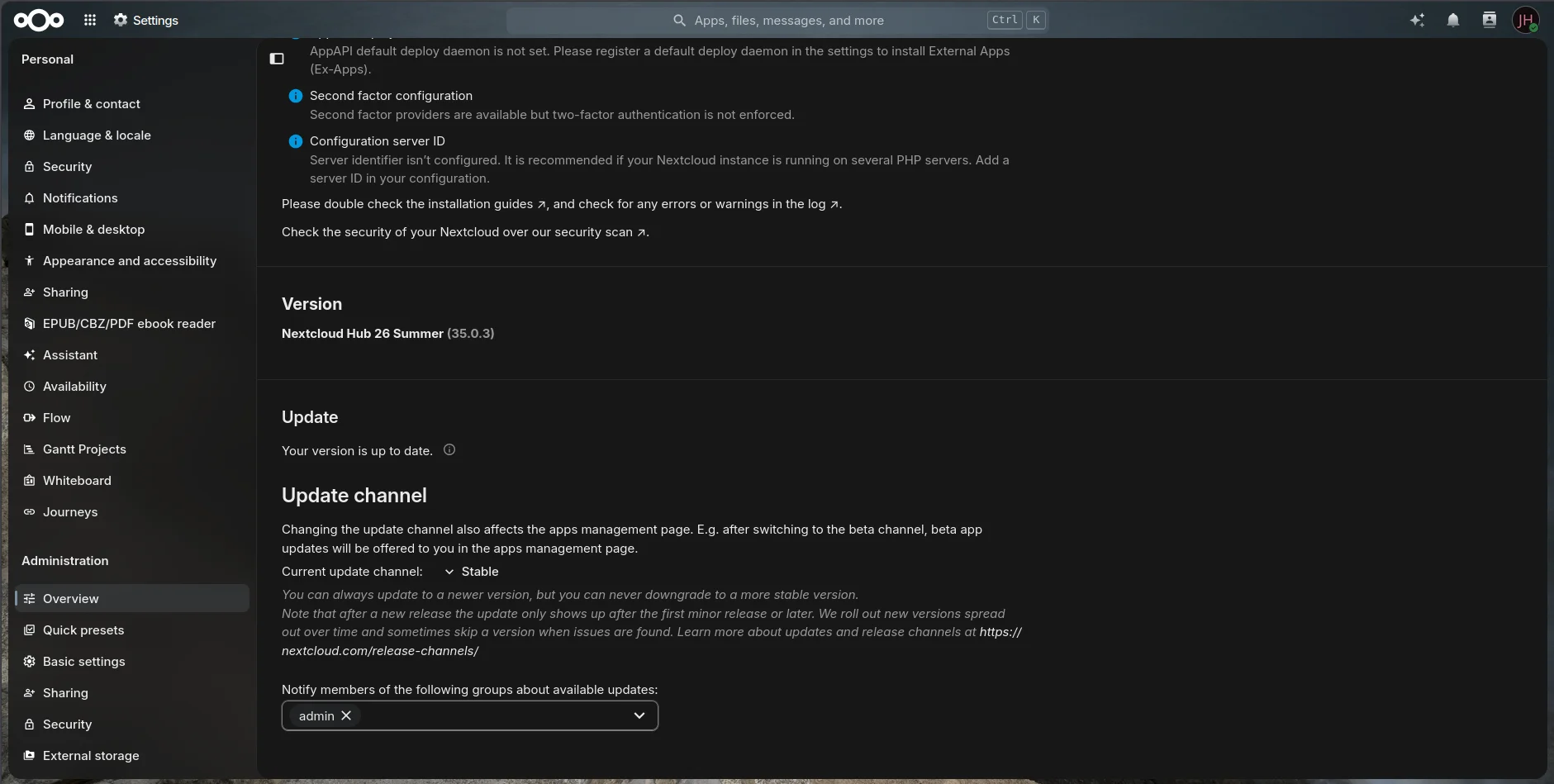
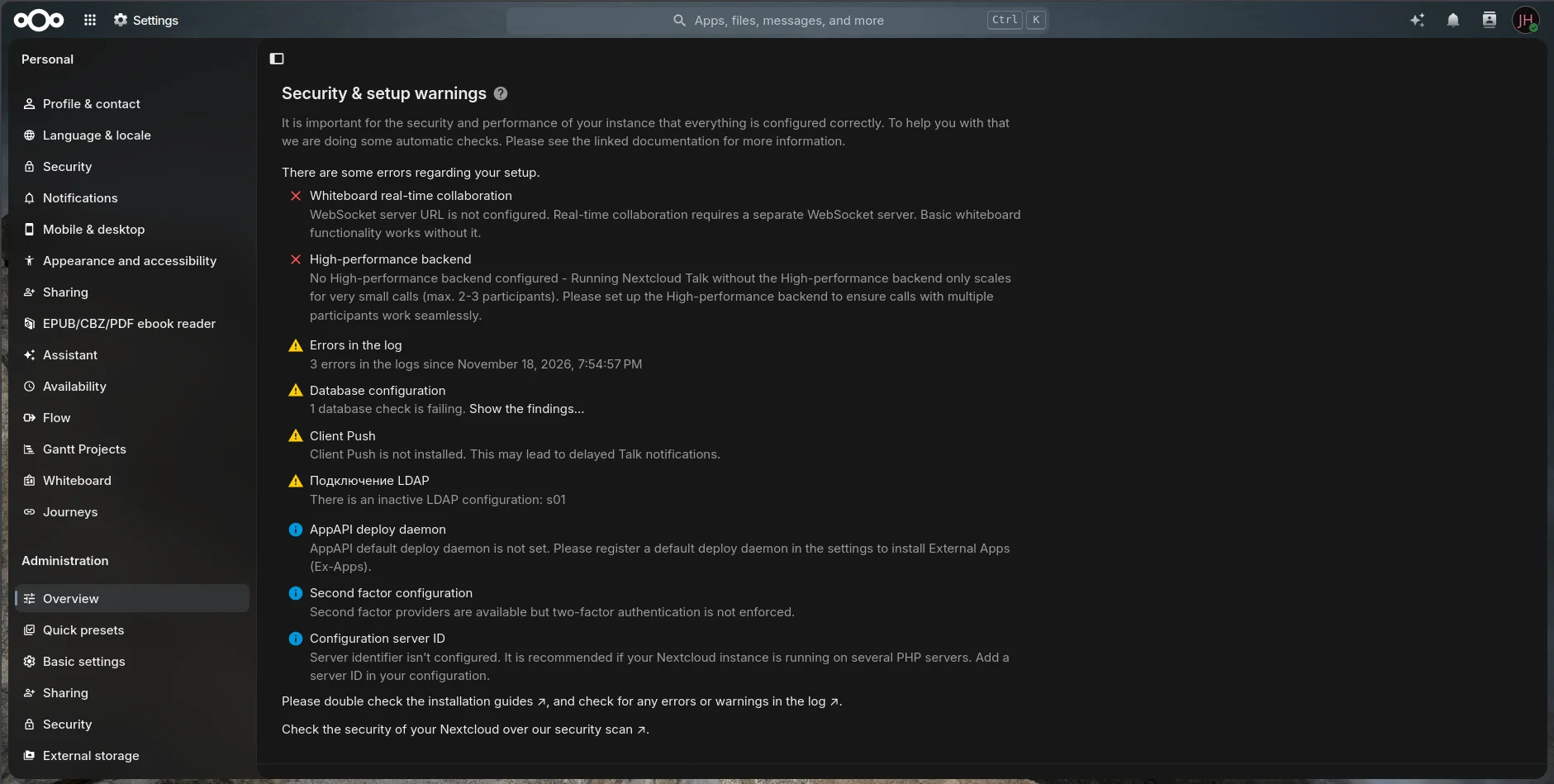
The overview on 35.0.3 has fewer warnings than before the upgrade. Code integrity, cron, the missing indices and the Talk repair steps are gone. The optional extras are still there, plus one failing database check, which is the Team Folders index, and three errors in the log to read through.
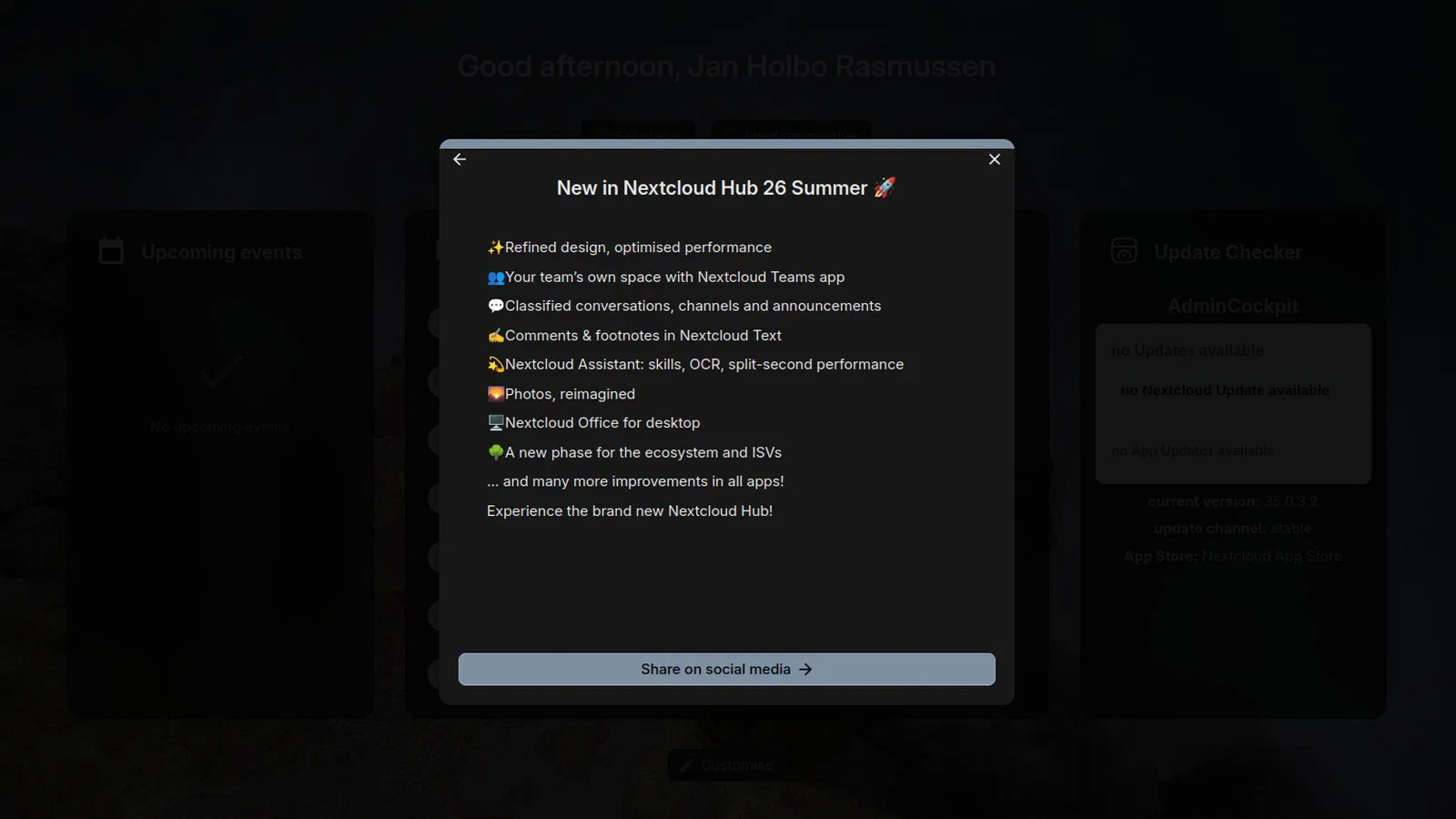
The first time I opened the dashboard, 35 introduced itself with the dialog at the top of this post: the new Teams app, channels in Talk, comments in Text, a reworked Photos and more. The search field is now “Apps, files, messages, and more”, with Ctrl+K.
My check afterwards was a quick one. Files, Calendar, Talk and the new Teams app opened and worked, and two phones and a Linux desktop client carried on syncing after a minute’s pause each time. I haven’t opened a Word or LibreOffice document in Nextcloud Office yet; that’s next.
Still on the list, none of it urgent:
- The eight warnings that some of our config files differ from the image’s versions. Most are probably old edits, but worth a comparison.
- Updating MariaDB, Redis and nginx, one at a time, now that their tags are visible.
- The leftover tables, and the Team Folders index.
- Deleting the
@before-nc35and@after-34xsnapshots after a week or so. - Finding out why PHP crashed twelve times in August and September.
What I’d do differently
- Check that the backup exists. My dump was a command in a plan, not a file on a disk.
- Pin exact image tags.
34.0andalpinehide which version you run, and a casualup -dcan upgrade more than you meant to. - Read the integrity check’s list before worrying. Ours was twelve crash dumps.
cdinto the compose folder first. Obvious, and I still got it wrong.- Snapshot between the two steps. It cost a minute and would have saved redoing the first step.
The upgrade itself was the easy part: two image tags and a minute each. The work was in the hour before, reading what the server was telling me.
Sources
- November maintenance updates for Nextcloud Hub 26 (Nextcloud community): 35.0.3, 34.0.6 and 33.0.11, released 12 November 2026. Pulled 2026-11-22.
- How to upgrade (Nextcloud Administration Manual): “You cannot skip major releases”, the newest point release first, and Docker installs follow their own instructions. Pulled 2026-11-25.
- nextcloud/docker (GitHub): The official image; upgrading means pulling a new image. Pulled 2026-11-25.
- Nextcloud 35 system requirements (Nextcloud Administration Manual): PHP 8.3 to 8.5, MariaDB 10.11 and newer. Pulled 2026-11-22.