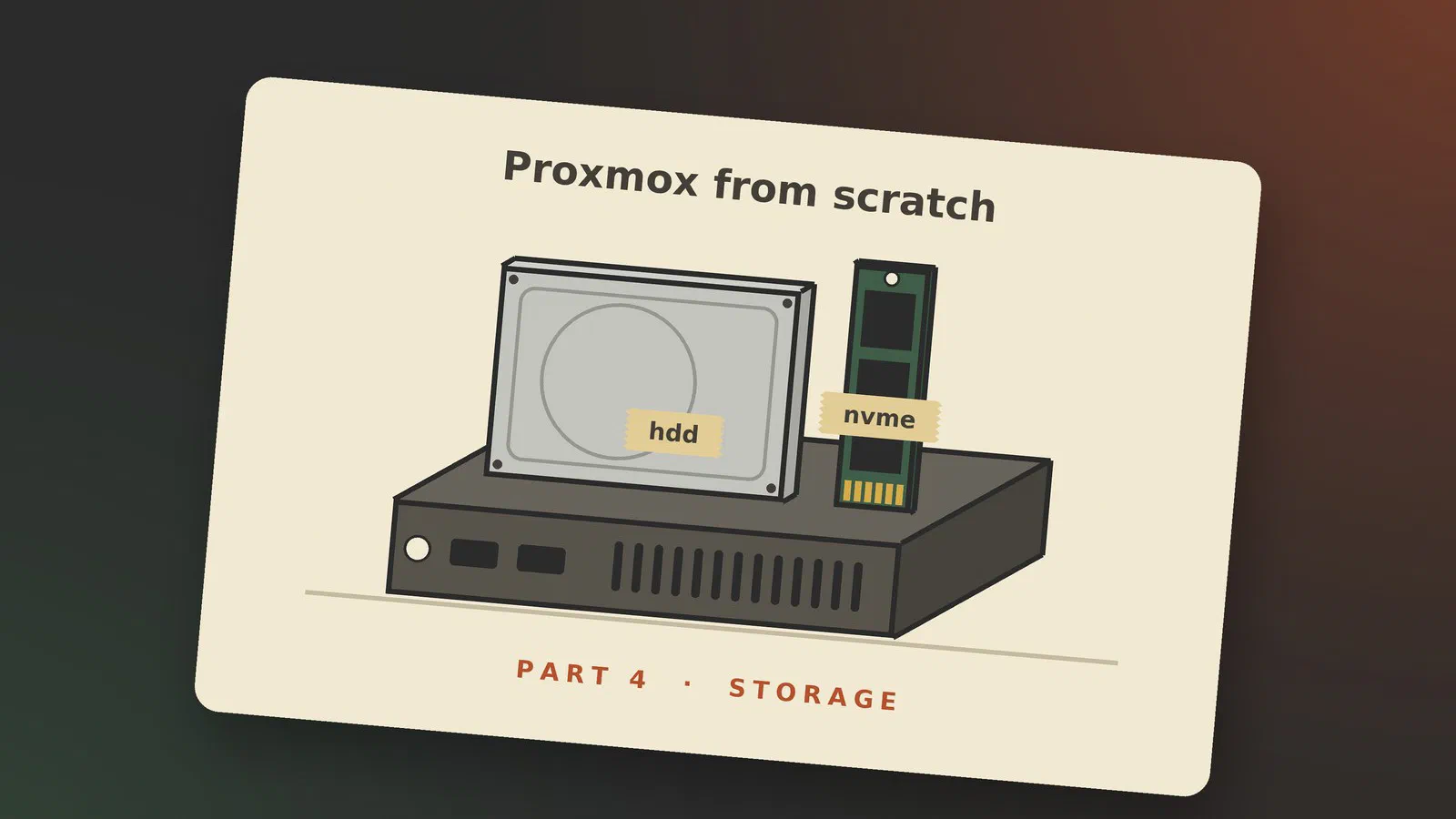
This is the fourth part of Proxmox from scratch. In part 2 and part 3 we created a virtual machine and a container, and both times I put their disks on a storage called vmdatanvme and promised to explain it later. This is later.
The post has two halves. The first is a tour: how Proxmox thinks about storage, and the kinds it can use, from a folder on the server’s own disk to Ceph spread over several servers. The second is what I do on my own servers, and here there is a twist. In part 7 my servers become a cluster, and in part 8 guests move between them. For that to work, the storage has to be set up the same way on every server, and that is easiest to get right now, before there is a cluster.
How Proxmox thinks about storage
To Proxmox, a storage is a named place where it may put things. Each one has a type, such as a directory, an LVM-thin pool or a ZFS pool, and a name, which the documentation calls the storage ID: “Each storage pool has a <type>, and is uniquely identified by its <STORAGE_ID>.” [1]
A fresh server has two of them. local is a folder, /var/lib/vz, and holds ISO images, container templates and backups. The second holds the disks of your virtual machines and containers. On a server installed with ZFS, as in part 1, it is called local-zfs; on one installed with ext4 or xfs, it is local-lvm [1].
Everything Proxmox stores is named after the storage it is on. A disk is a storage ID, a colon and a name that depends on the storage type, such as local:230/example-image.raw [1]. You saw that in part 3, where the container’s disk was written as vmdatanvme:32 on the Confirm tab: 32 GiB on the storage vmdatanvme. A guest’s configuration names the storage, not the folder or disk behind it. That detail matters further down.
File-level vs block-level storage
Storage types come in two kinds. On file-level storage, a virtual machine’s disk is a file in an ordinary file system, and ISO images and backups can sit next to it. On block-level storage, the disk is a raw slice of the storage. That is fast, but “it is usually not possible to store other files (ISO, backups, ..) on such storage types.” [1] That is why a fresh server has two storages: local for files, and local-zfs or local-lvm for disks. ZFS is listed as both [1]: a virtual machine’s disk is a block device, and a container’s disk is a folder.
Content types
Each storage has a list of what it may hold, its content types [1]:
| Content type | What it is |
|---|---|
images | disks of virtual machines |
rootdir | disks of containers |
iso | ISO images |
vztmpl | container templates |
backup | backups (vzdump) |
snippets | small files such as hook scripts |
import | OVA files and disk images to import virtual machines from |
The list also decides what the dialogs offer. When you create a virtual machine, the disk dropdown only lists storages with images ticked, and the ISO dropdown only those with iso.
One list for the whole cluster
All of this is kept in one text file: “All Proxmox VE related storage configuration is stored within a single text file at /etc/pve/storage.cfg.” [1] On a new server installed with ZFS, it looks like this [1]:
dir: local
        path /var/lib/vz
        content iso,vztmpl,backup

zfspool: local-zfs
        pool rpool/data
        sparse
        content images,rootdir
The file is in /etc/pve, and in a cluster that folder is the same on every server: “it gets automatically distributed to all cluster nodes. So all nodes share the same storage configuration.” [1] A storage is defined once, for the whole cluster.
That raises an obvious question. local-zfs is the NVMe drive inside one particular server. What does it mean on another? The documentation’s answer is that such a storage “is available on all nodes, but it is physically different and can have totally different content.” [1] Each server has its own local-zfs, made from its own drive, with the same settings. Keep that in mind: it is the whole point of the second half of this post.
Local storage
Local storage is on the server’s own disks. It is the fastest kind and the simplest, and on a server at home it is usually all you need.
Directory
A directory storage is a folder, and file level, so it can hold anything [1]. local is one. It is also the way to use a disk Proxmox has no special support for, such as an old USB disk formatted with ext4: mount it in /etc/fstab and add the folder as a directory storage [1]. A directory has no snapshots of its own, so virtual machine disks on it use the qcow2 format, which has them built in, at some cost in speed [1].
LVM and LVM-thin
LVM, the Logical Volume Manager, is Linux’s way of carving disks into volumes. Plain LVM sets aside every block of a volume when it is created. LVM-thin does not: “LVM thin pools instead allocates blocks when they are written.” [1]
That is called thin provisioning, and ZFS does it too. A virtual machine with a 32 GB disk, where the system inside uses 3 GB, only takes 3 GB on the storage [1], which is why the 32 GiB disks in parts 2 and 3 cost almost nothing to begin with. The other side is that you can promise your guests more space than you have. If they all use it, the storage fills up, and “all guests using volumes on that storage receive IO errors” [1]. Keep an eye on how full it is.
LVM-thin is what you get when you install Proxmox with ext4 or xfs: the storage local-lvm. It is block level, has snapshots and needs no extra memory, but it only holds disks, and only on the server it is on [1].
ZFS
ZFS is the file system I chose in part 1, and for a server with enough memory it is the one I recommend. The Proxmox documentation agrees that it stands out: “ZFS is probably the most advanced storage type regarding snapshot and cloning.” [1]
It is two things in one. It manages the disks, like a RAID controller, and it is the file system on them. Every block is checksummed, so errors are found instead of passed on. Snapshots are instant and cheap. Compression is on by default, and Proxmox recommends lz4, “because it adds very little CPU overhead” [2]. And a snapshot can be sent to another ZFS machine with zfs send, which is how my backups work (see my 3-2-1 post) and how Proxmox’s own replication works, which we’ll get to in a moment.
A ZFS pool is divided into datasets. A dataset is a bit like a folder, but each one has its own settings, its own snapshots and its own quota. On a server installed with ZFS, the pool is called rpool and the guests’ disks go in the dataset rpool/data [1]. For each guest disk, Proxmox makes a dataset of its own underneath: “The backend uses ZFS datasets for both VM images (format raw) and container data (format subvol).” [1] The sparse line in the configuration above switches on thin provisioning for the virtual machines’ disks [1].
The price is memory. Proxmox VE sets ZFS’s cache, the ARC, to 10% of the server’s memory, at most 16 GiB, on new installations, and its rule of thumb for what ZFS needs is 2 GiB plus 1 GiB per TiB of storage [2]. My two Tinys have 64 and 32 GB, so that is no problem. On an 8 GB machine, think twice.
On phoebe, my main server, the pool runs with deduplication switched on, which ZFS can do but is usually told not to. I explained why in My hypervisors in 2026. It is not something to switch on on a new server without a reason.
Network storage
Network storage is on another machine, usually a NAS, and Proxmox mounts it for you. The two common kinds are NFS and SMB/CIFS, both file level, so they can hold anything. In a cluster, a share has one big advantage: it is the same on every server. Proxmox calls that shared, “a single storage with the same contents on all nodes” [1], and a guest whose disk is on shared storage can move to another server without its disk being copied.
At home, the more common use is a share on the NAS for ISO images and backups. I don’t use network storage in Proxmox myself. My guests run on local ZFS, and the copies to stephen are made with ZFS, not through a share. NFS and SMB as a place for backups come back in part 6, on backups.
Distributed storage: Ceph
Ceph spreads the data over the disks of several servers, keeps copies on more than one of them, and carries on when a disk or a whole server fails. To the guests it looks like shared storage, without a NAS. It is also the one I would leave alone at home. It wants at least three servers, preferably identical, and a network of 10 Gbps or more for Ceph alone [3]. Two one-litre PCs and a tower at the end of a PowerLine link are not that. ZFS on each server, with replication between them, gives me most of what I want for a fraction of the effort. Part 7 has more on why.
Adding storage in the web interface
There are two places in the web interface to add storage, and which one you use depends on what you have.
A whole new disk in the server. Click the server’s name in the tree, then Disks. The list shows every disk the server can see, and whether it is in use. For a new ZFS pool, choose Disks → ZFS and click Create: ZFS. Give the pool a name, choose the disks and the RAID level (Single Disk for one disk), and leave compression and ashift as they are. With Add Storage ticked, the new pool is added as a storage straight away. There are similar pages under Disks for LVM, LVM-thin and a directory. A disk that has been used before must be wiped first, with Wipe Disk on the Disks page. That erases it, so check twice that it is the right one.
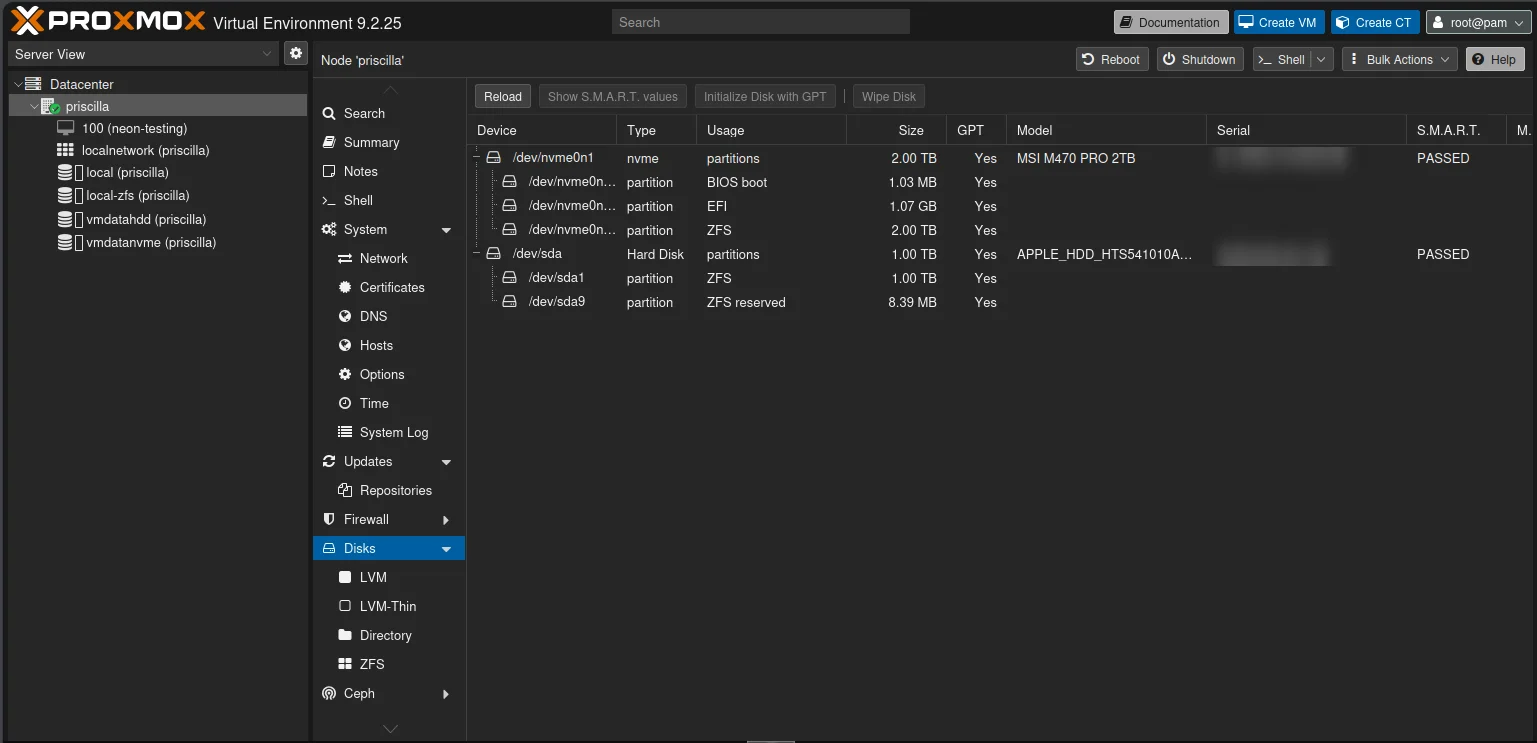
On priscilla the Disks page shows two drives: the 2 TB NVMe drive, which the installer partitioned for ZFS, and the 1 TB hard drive in the 2.5" bay, with one big ZFS partition.
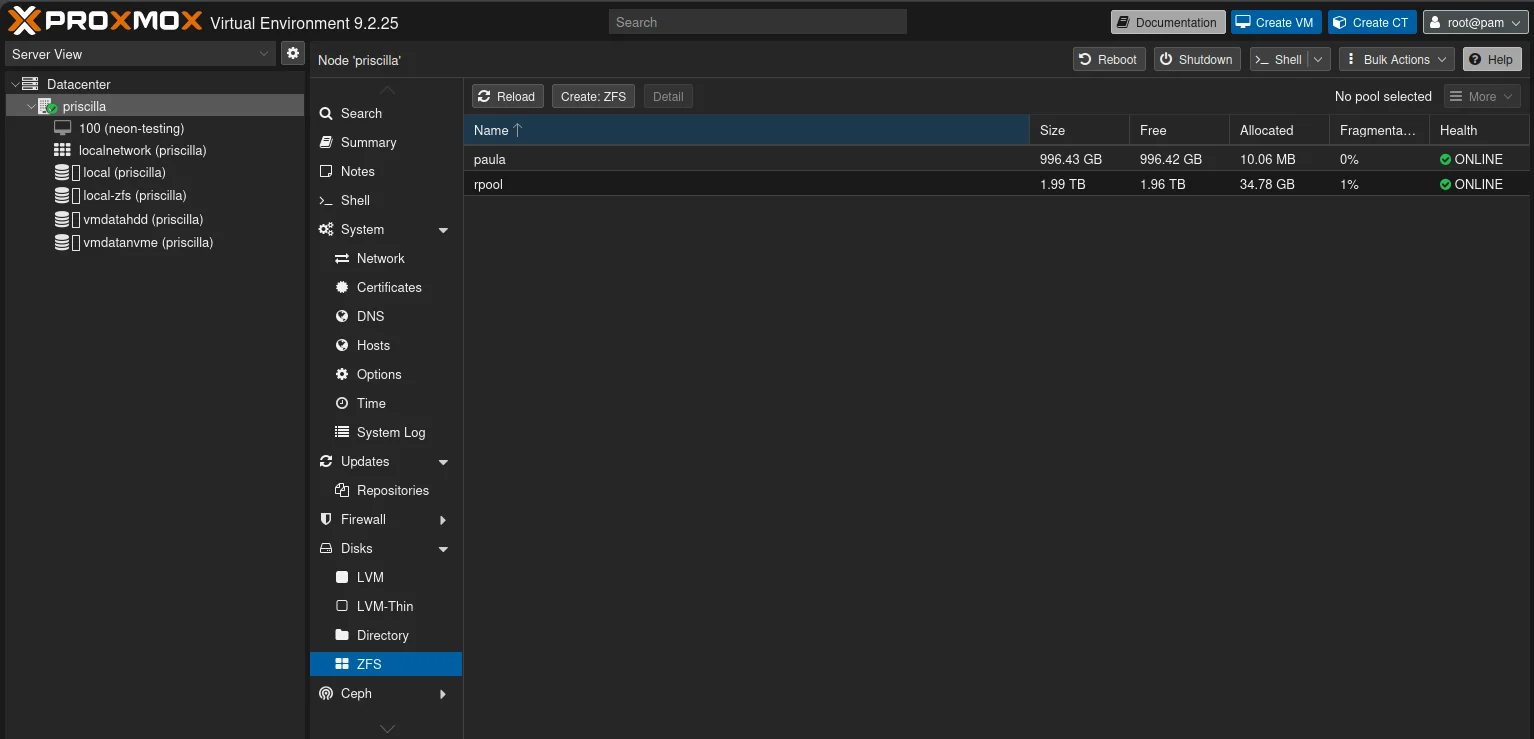
Disks → ZFS lists the pools on them: rpool on the NVMe drive, which the installer made, and paula on the hard drive. My pools are named after the custom chips of the Amiga, and Paula was its sound chip. I made paula in the Shell with zpool create rather than with Create: ZFS, but the pool is the same either way.
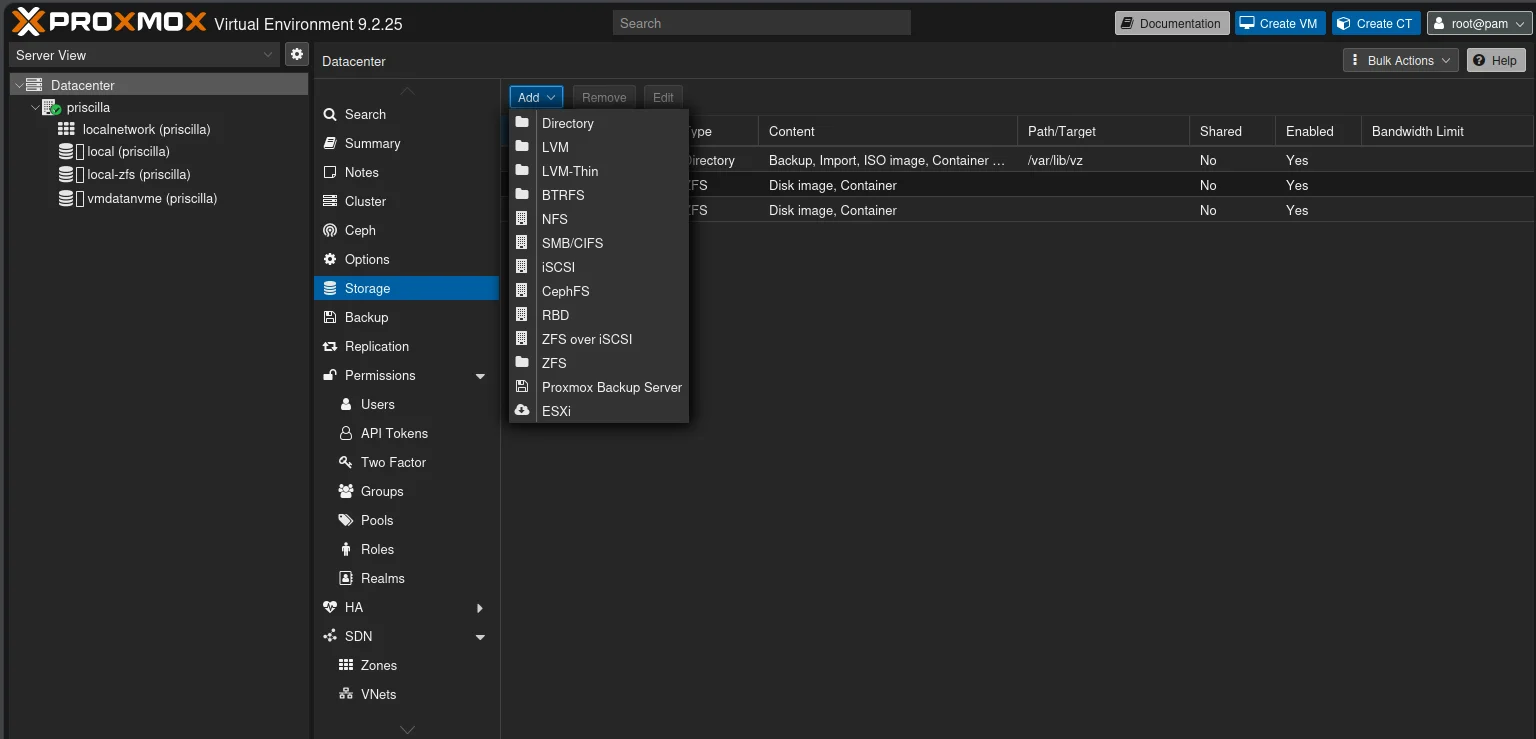
Something that exists already. A share on a NAS, a folder, or a ZFS dataset you made yourself. Go to Datacenter → Storage and click Add. The list has an entry for each type: Directory, LVM, LVM-Thin, BTRFS, NFS, SMB/CIFS, iSCSI, CephFS, RBD, ZFS over iSCSI, ZFS, Proxmox Backup Server and ESXi. Each opens a dialog with an ID, which is the storage’s name, the settings for that type, the Content types it may hold, and Nodes, the servers it is used on.
The Nodes field is the one to understand, because it is easy to overlook while there is only one server. It is the “list of cluster node names where this storage is usable/accessible” [1]. Left empty, it means all of them. A storage that only exists on one server, such as a USB disk plugged into it, should have that server in Nodes. Otherwise the other servers look for it too, and show it as unavailable.
The same can be done on the command line with pvesm, the storage manager. pvesm status lists the storages and how full they are; pvesm add adds one [1]. The example further down uses it.
Same name, same path on every server
So far, this is how every guide does it. Here is the part that changes when there is more than one server, and that I am sorting out now, before mine become a cluster.
Tiers, not servers
I don’t put my guests on local-zfs. I sort their disks into tiers, by the kind of drive they should be on, and each tier is a storage of its own:
vmdatanvme, for what has to be fast: the containers’ own disks, applications, databases.vmdatahdd, for bulk data on a hard drive: media, old photos, things that are big and read now and then.- Later perhaps
vmdatassd, for a tier of SATA SSDs in between.
The storage ID says what kind of storage a disk is on, not which server it is on. A container that needs fast storage asks for vmdatanvme, and it gets the NVMe drive of whichever server it runs on. Keeping the guests in datasets of their own, apart from local-zfs, also makes the backups simple: a tree per tier to snapshot and pull to stephen, my backup server, and nothing else.
Why the path has to match
The names were right from the start. The paths were not. On phoebe, my main server, the tiers were rpool/data/phoebe/vmdatanvme and rpool/data/phoebe/vmdatahdd, and when I set up priscilla I followed the same pattern: rpool/data/priscilla/vmdatanvme, and paula/data/priscilla/vmdatahdd on the hard drive. Each server’s name was in its own paths. On two separate servers that does no harm. In a cluster it does, for two reasons.
The first is the configuration. A storage is defined once for the whole cluster: the storage vmdatanvme is one entry in storage.cfg, with one pool line. On every server where it is enabled, Proxmox looks for that one path. There is no way to say “this path on phoebe, that path on priscilla”.
The second is moving guests. When a guest moves to another server, Proxmox copies its disks to the storage of the same name there. Storage replication, which keeps a copy of a guest’s disks on another server every 15 minutes by default so that a move only has to send what changed, works the same way: “This reduces the time needed significantly.” [4] Replication only works with ZFS, and one of the problems the documentation lists for it is exactly this: “Storage with the same storage ID is not available on the target node.” [4]
So the rule for a cluster with local storage is: the same storage ID, pointing at the same path, on every server that runs guests. Each server’s copy is physically its own, but they look the same to Proxmox.
My tier model
That gives me three rules.
- The storage ID is the tier, and it is the same on every server:
vmdatanvme,vmdatahdd, and latervmdatassd. - Each tier’s pool has the same name on every server. The pool is the first part of the path, so it has to match too. The NVMe tier is on
rpool, the pool the installer makes, on every server. The hard-drive tier is on a pool calledpaula, on every server that has a hard drive. A future SSD tier gets another Amiga chip’s name, the same everywhere. FatAgnus, stephen’s pool, is the exception: it is the backup server’s pool, not a tier for guests, so it keeps its own name. - The server’s name is not in the path.
For phoebe and priscilla that means:
| Storage ID | Dataset | Servers |
|---|---|---|
vmdatanvme | rpool/data/vmdatanvme | phoebe, priscilla |
vmdatahdd | paula/data/vmdatahdd | priscilla, until phoebe has a hard drive |
stephen will be in the cluster too, as its third vote, but it runs no guests, so it is never in a tier’s list of servers. Its pool, FatAgnus, is not a Proxmox storage at all. It is where the backups land, and Proxmox doesn’t need to know about it.
CT 1001, my Nextcloud container on phoebe, shows the idea in miniature. Proxmox lets you put tags on a guest, and among its tags are vmdatanvme and vmdatahdd, the two tiers it has disks on. When I move it, I can see at a glance which tiers the other server needs. It started with this one container, and I’m making it a habit for every guest.
phoebe has had only its NVMe drive, so its vmdatahdd has been a placeholder on the NVMe, holding Nextcloud’s files. Since last night a 1 TB 2.5" hard drive sits in phoebe too, and before I trust it with anything it gets tested: a long SMART self-test, which it passed, and a full write-and-read pass over the whole disk, which takes the better part of a day. If it passes, phoebe gets a paula pool of its own, vmdatahdd moves onto it, and the hard-drive tier is the same on both Tinys. Until then, phoebe’s vmdatahdd stays where it is.
Renaming the datasets
I renamed everything with the guests stopped, before the cluster is created in part 7. A dataset is renamed with zfs rename, and everything under it, its snapshots and child datasets, comes along.
priscilla had nothing left on it after I deleted part 2’s test VM, so it was quick:
zfs rename rpool/data/priscilla/vmdatanvme rpool/data/vmdatanvme
zfs rename paula/data/priscilla/vmdatahdd paula/data/vmdatahdd
zfs destroy -r rpool/data/priscilla
zfs destroy paula/data/priscilla
The last two lines remove the old parent datasets, which are empty now. The first of them needed -r. sanoid, which takes my snapshots, had been snapshotting rpool/data/priscilla itself, and ZFS won’t destroy a dataset that still has snapshots. -r takes them along, but it also takes any dataset still below, so check with zfs list -t all -r first that there is nothing but snapshots left.
On phoebe, the NVMe tier was renamed the same way:
zfs rename rpool/data/phoebe/vmdatanvme rpool/data/vmdatanvmeThen the storage definitions. The pool path of a ZFS storage can’t be changed once the storage exists: in Proxmox’s own code, pool is a fixed setting [5]. So I removed each storage and added it again with the same ID and the new path. Removing a storage definition only removes the entry, not the data. And since the guests’ configurations name the storage, vmdatanvme, and not the path, their disks were found again without any change.
On both servers, in the Shell:
pvesm remove vmdatanvme
pvesm add zfspool vmdatanvme --pool rpool/data/vmdatanvme --content images,rootdir --sparse 0
--sparse 0 keeps thin provisioning off, as my storages have always had it. It only matters for virtual machine disks; a container’s disk is a dataset with a size limit either way.
On priscilla, I added vmdatahdd again in the web interface instead, to show the dialog: Datacenter → Storage → Add → ZFS. Type the ID, pick the dataset under ZFS Pool, and leave Content at Disk image, Container. Thin provision is the same setting as --sparse.
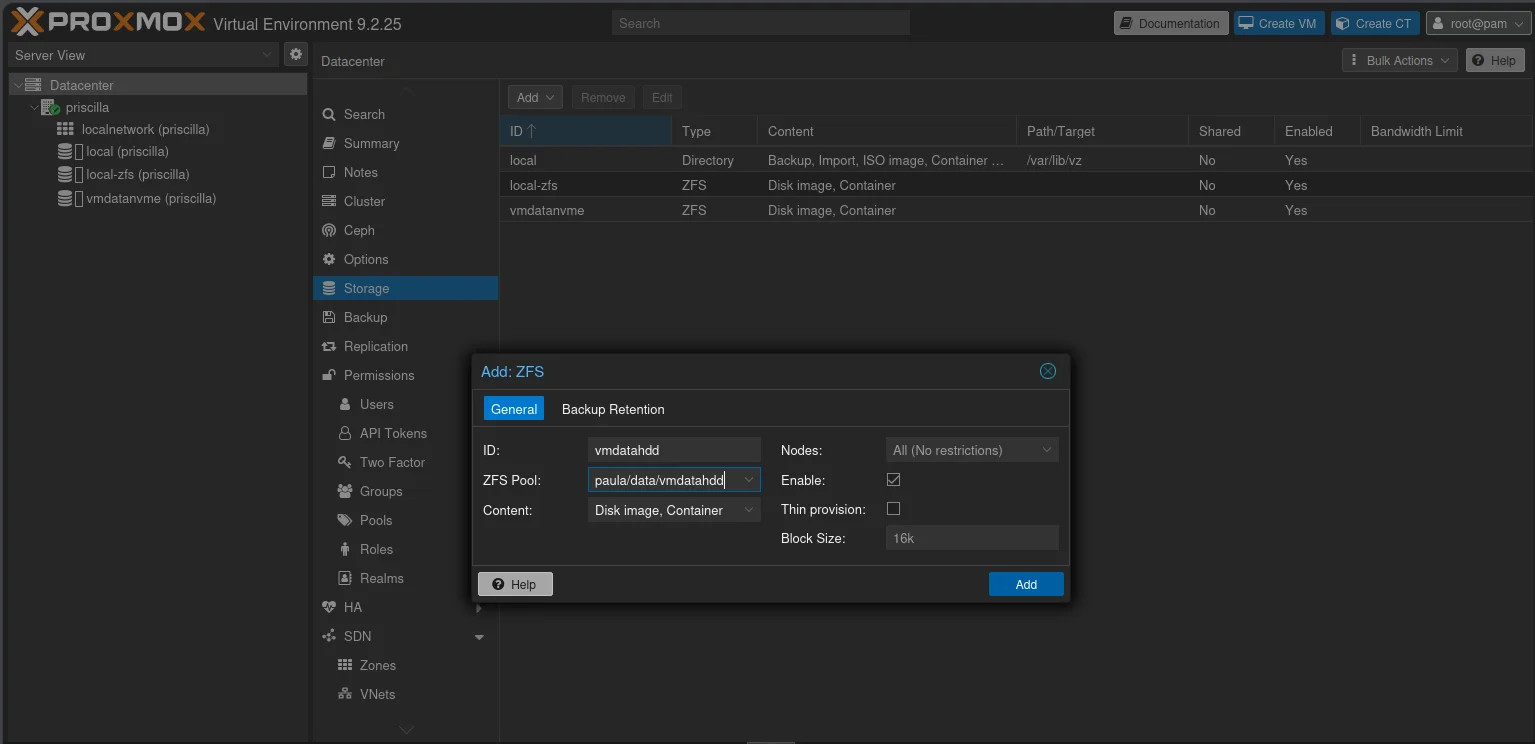
The storage list doesn’t show where a ZFS storage points, only its name and type, so the list after the change looks just like the one before. zfs list in the Shell shows the new paths, with no server name in them.
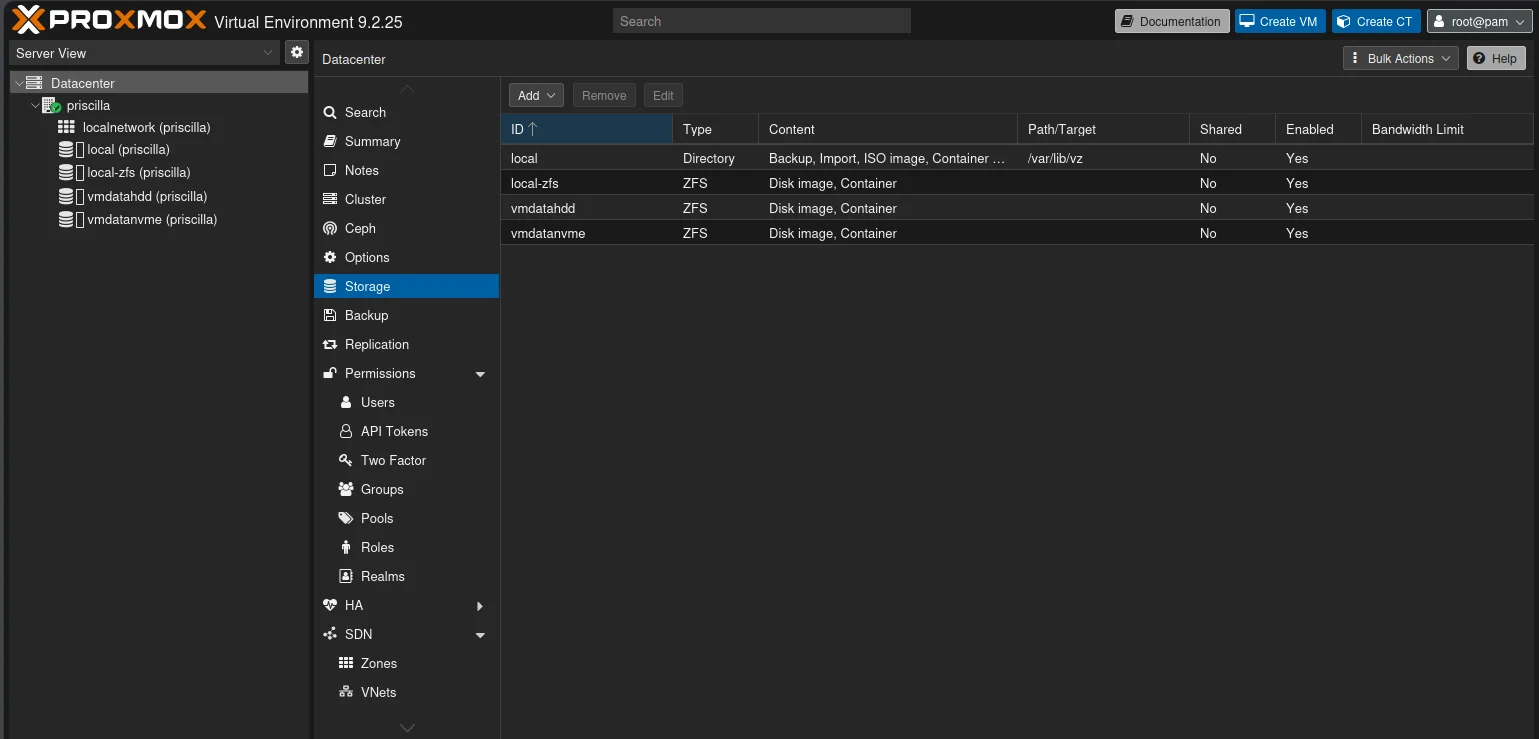
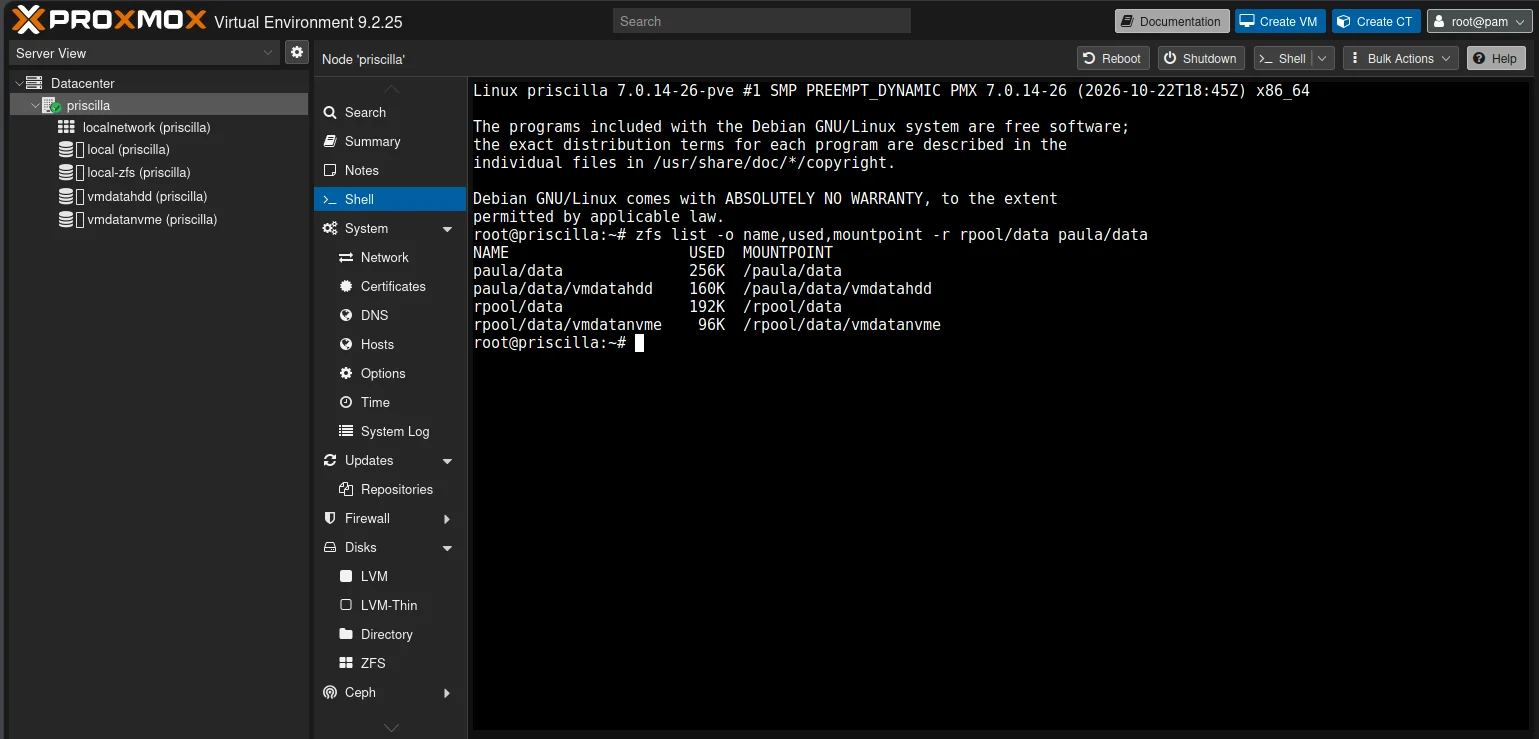
There is one thing to watch when priscilla joins the cluster in part 7: its own storage.cfg is replaced by the cluster’s, which is phoebe’s. If phoebe has its paula by then, both servers define vmdatahdd the same way and nothing changes. If not, the hard-drive tier has to be set up again after the join, with Nodes set to priscilla. That is in part 7.
The paths Proxmox doesn’t know about
On phoebe, the rename wasn’t quite the end of it. Nextcloud’s container has its own disk on vmdatanvme, and that one was fine. But it also has four folders bound in from the server: the database, the app, the Redis cache and the user data. Those are written in the container’s configuration as full paths, and after the rename three of them pointed at a folder that no longer existed. So before starting the container, I changed them in its configuration file:
sed -i 's#/rpool/data/phoebe/vmdatanvme/#/rpool/data/vmdatanvme/#g' /etc/pve/lxc/1001.conf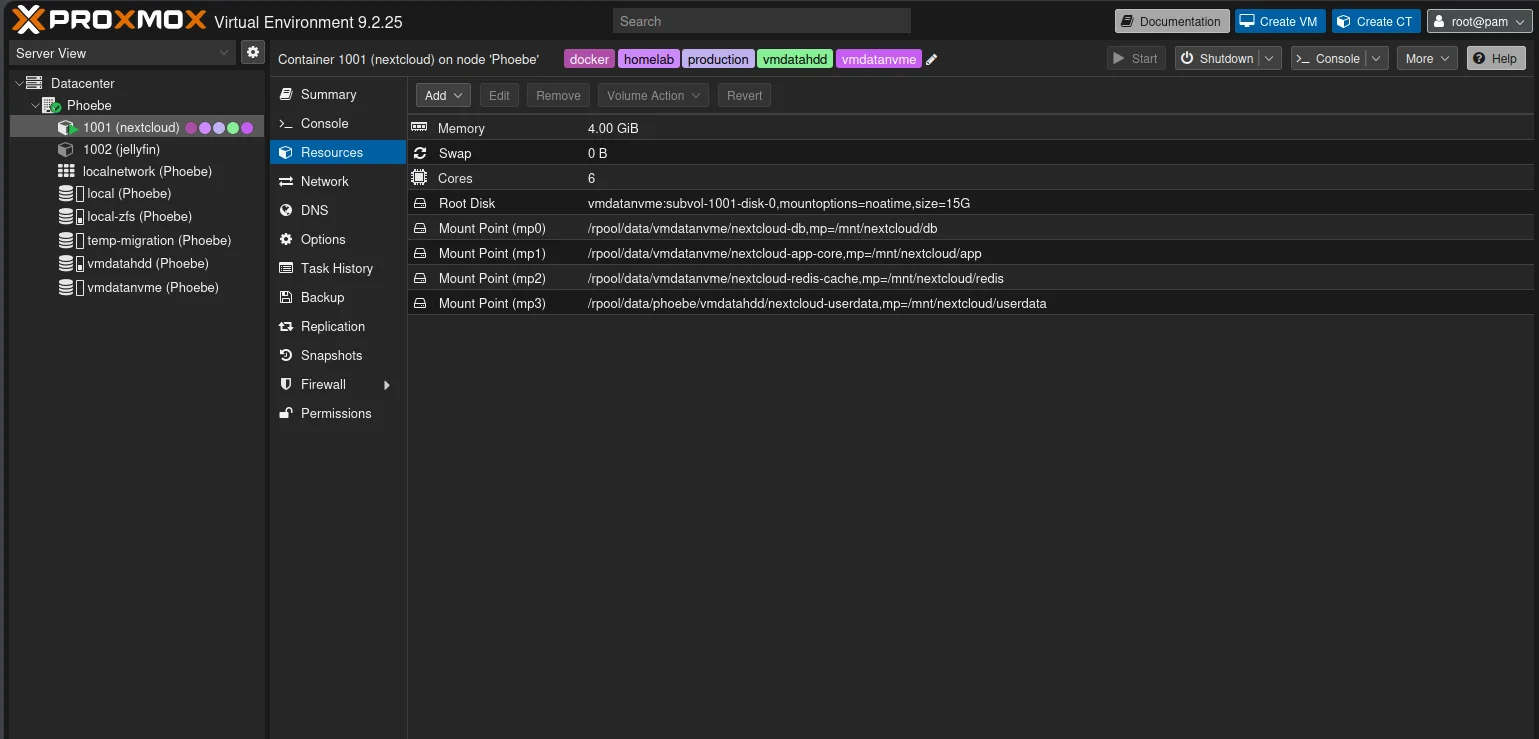
Then I started it and checked from the server that all four were there:
pct exec 1001 -- df -h /mnt/nextcloud/db /mnt/nextcloud/app /mnt/nextcloud/redis /mnt/nextcloud/userdataThe difference between those four and the container’s own disk is the subject of the last section.
The backups follow
The backups have to follow as well. sanoid takes the snapshots on both servers, and syncoid on stephen pulls phoebe’s to stephen once an hour. Both name the paths, so sanoid.conf on each server and the cron line for syncoid on stephen got the new ones. A renamed dataset keeps its snapshots, so the next pull carried on where the last one had stopped: it only sent what had changed since the hour before, starting from a snapshot taken before the rename.
While I was at it, I gave each server its own place on stephen. The copies used to land in fatagnus/backup/vmdatanvme. With the server’s name gone from the paths on phoebe and priscilla, two servers would now pull into the same place, so on the backup server the name goes back in: fatagnus/backup/phoebe/vmdatanvme, and later fatagnus/backup/priscilla/.... zfs rename -p moved the existing copies, and the pulls carried on as before.
The pull by hand also turned up a backup that had been failing quietly for nine days, because the cron line sent its errors to cron’s mail instead of the log. If you run backups from cron, write >> /var/log/syncoid.log 2>&1, not 2>&1 >> /var/log/syncoid.log: the order decides where errors go. Part 6 has the whole story.
One more thing about settings. A new dataset inherits its settings, such as compression and record size, from the dataset above it. When Proxmox replicates a guest’s disk to the other server, the settings set on the disk itself travel with it, but inherited ones don’t [5]. So give each tier the same settings on every server, and the copies will behave the same wherever they are. On phoebe that includes deduplication, which is on for the whole pool. priscilla’s pools had it off, so I turned it on there as well, for both rpool and paula, with zfs set dedup=on. It only applies to what is written from then on, which on an empty tier is everything. phoebe’s paula will get the same setting when it is created.
Containers and their mount points
In part 3 I promised to come back to mount points, the extra storage a container can be given besides its own disk. There are two kinds, and the difference matters as soon as there is more than one server.
A volume mount point lives on a Proxmox storage. On ZFS it is a dataset of its own, which Proxmox creates, sizes and snapshots: “ZFS subvolumes: these are technically bind mounts, but with managed storage, and thus allow resizing and snapshotting.” [6] Because Proxmox knows about it, it moves with the container, and “by default, additional mount points are replicated when the Root Disk is replicated.” [6] For a mount point you don’t want copied, such as a cache, each mount point has a Skip replication option [6].
A bind mount point hands the container a folder that already exists on the server. Proxmox doesn’t manage it: “Bind mounts are considered to not be managed by the storage subsystem, so you cannot make snapshots or deal with quotas from inside the container.” [6] It is also not backed up with the container, as part 3 said, and it does not move. The folder is on one server, and the container can’t take it along.
My Nextcloud container is the example of the second kind. Its four mount points are bind mounts of datasets I made by hand, which is why the rename needed a hand edit, and why my own snapshots and syncoid, not Proxmox, look after them. It also means CT 1001 can’t simply move to priscilla. Before part 8 I’ll either turn them into volume mount points, or accept that Nextcloud stays on phoebe.
So for a cluster, volume mount points are the ones that fit. Bind mounts still have their place, for a folder that is shared between several containers on one server, but a container with one is tied to that server.
This is why Jellyfin’s config, metadata and media will be volume mount points on vmdatanvme and vmdatahdd in the Jellyfin at home series, not folders bound in from the server. In part 8 Jellyfin moves to priscilla, and its library has to be able to go with it.
Which storage to choose for a homelab
If you have read this far, here is the short version.
- One server with 16 GB of memory or more: ZFS, chosen in the installer as in part 1. Even on a single disk you get checksums, compression and snapshots, and later you can send those snapshots to another machine.
- A server with little memory: ext4 in the installer, which gives you
local-lvm, LVM-thin. It is plain, fast and needs nothing extra. - A NAS in the house: an NFS share for ISO images and backups. It keeps them off the server’s disks, and the backups on another machine.
- More than one server: decide on the names and the paths of your storages before you build the cluster, and use the same ones on every server. Name storages after what they are, not where they are. With ZFS, add replication, and moving a guest only has to copy what changed since the last run.
- Ceph: when you have three similar servers, a fast network between them, and memory to spare. Not before.
My own: ZFS on both Tinys, one storage per tier with the same pool and the same path on every server, and the backups pulled to stephen’s RAIDZ2 pool.
What’s next
The guests now have somewhere to live, on every server that will run them. In the next part we connect them: networking inside Proxmox, with bridges, VLANs and more than one network.
Sources
- Proxmox VE Storage (Proxmox VE 9.2 documentation), pulled 2026-10-29
- ZFS on Linux (Proxmox VE documentation), pulled 2026-10-29
- Deploy Hyper-Converged Ceph Cluster (Proxmox VE 9.2 documentation), pulled 2026-10-29
- Storage Replication (Proxmox VE 9.2 documentation), pulled 2026-10-29
- ZFSPoolPlugin.pm (pve-storage source on GitHub), pulled 2026-10-26 and 2026-10-29
- Proxmox Container Toolkit: mount points (Proxmox VE 9.2 documentation), pulled 2026-10-29