In part 1 I left hardware acceleration switched off. Most of the time that doesn’t matter, because most of the time Jellyfin doesn’t convert anything. But when it has to, a 4K HDR film is enough to bring my server to its knees. This part hands the graphics chip in phoebe’s processor to Jellyfin, and measures what changes.
Direct play vs. transcoding
When you press play, Jellyfin first checks whether the client can play the file as it is: the container, the video and audio codecs, the bitrate, and for HDR whether the screen can show it. If it can, the server just sends the file. That’s direct play, and it costs the server almost nothing. If it can’t, Jellyfin transcodes: it decodes the video, changes what needs changing, encodes it again, and sends the result [3]. Which formats a client can take directly differs a lot between a browser, a phone app and a TV app [4].
The player shows which one is happening. In the web player, open the settings and choose Playback Info. Here is a 1080p H.264 clip in Firefox:
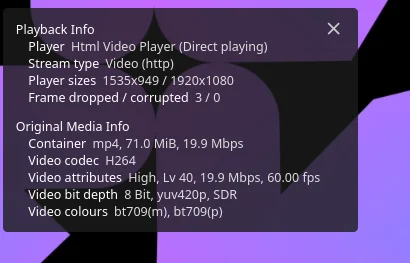
Direct playing: the browser takes the file as it is, and the server does no video work at all.
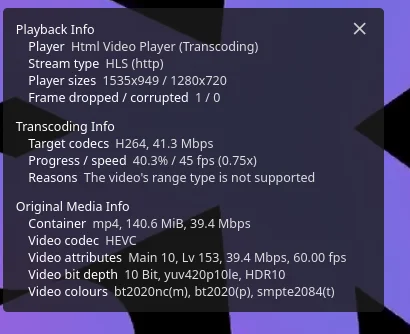
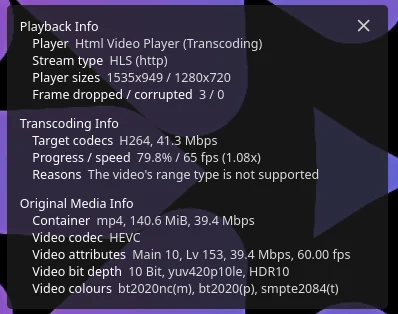
A 4K HDR10 clip in the same browser is a different story. The browser can’t show HDR, so Jellyfin has to convert the picture to ordinary SDR colours, and that means a full transcode. The reason it gives is “The video’s range type is not supported”. On my Samsung TV, which handles HDR10 itself, a 4K HDR film plays directly with the container at 2-2.5% CPU. So whether the server works hard depends on the client, not on the file alone.
The hardware: phoebe’s Ryzen APU
Jellyfin runs on phoebe, a Lenovo ThinkCentre M75q-1 Tiny with an AMD Ryzen 5 PRO 3400GE (more about it here). It’s an APU from 2019: four cores, eight threads, and Radeon Vega 11 graphics on the same chip. The part that matters here is the video engine in that graphics, AMD’s VCN 1.0. The container from part 1 has four of the cores.
Is it supported, and what do I need?
Nothing in this part is PCI passthrough to a virtual machine. That would take the whole graphics chip away from Proxmox and needs IOMMU switched on in the BIOS. Here, the host keeps the chip and its driver, and the container just gets access to one device file. So:
- BIOS: nothing to change, as long as the integrated graphics is enabled.
- Proxmox: nothing to install. The
amdgpudriver and its firmware come with the Proxmox kernel. - Container and Docker: nothing to install either. The official Jellyfin image comes with Jellyfin’s own build of FFmpeg and the drivers it needs [1].
Five minutes of checking on the host tells you whether it will work:
# the graphics chip, and which driver has it
lspci -k | grep -A3 -i vga

# the device file the container will get
ls -l /dev/dri

# the video engine loaded its firmware (a version that isn't 0 is good)
grep -i vcn /sys/kernel/debug/dri/*/amdgpu_firmware_info
On phoebe that gave Kernel driver in use: amdgpu, a
renderD128 owned by the group render, and VCN firmware version
0x0310f009. The boot log has one line that looks alarming,
psp gfx command LOAD_TA(0x1) failed, but it’s commonly reported on
these chips. As far as I can tell it concerns the content protection
side of the display, not video, and everything below worked with it.
Giving the container the graphics chip
Jellyfin runs in Docker, inside an LXC container, on the Proxmox host. So the device has to be handed down twice: from the host to the container, and from the container to Docker.
Step 1: from the host to the container
The container needs to know which group may use the device. That’s the
render group, and what counts is its number inside the container:
pct exec 1002 -- getent group renderrender:x:992:So 992. In the web interface, go to the container’s Resources → Add →
Device Passthrough, put /dev/dri/renderD128 as the path, tick
Advanced and put the number under GID in CT:
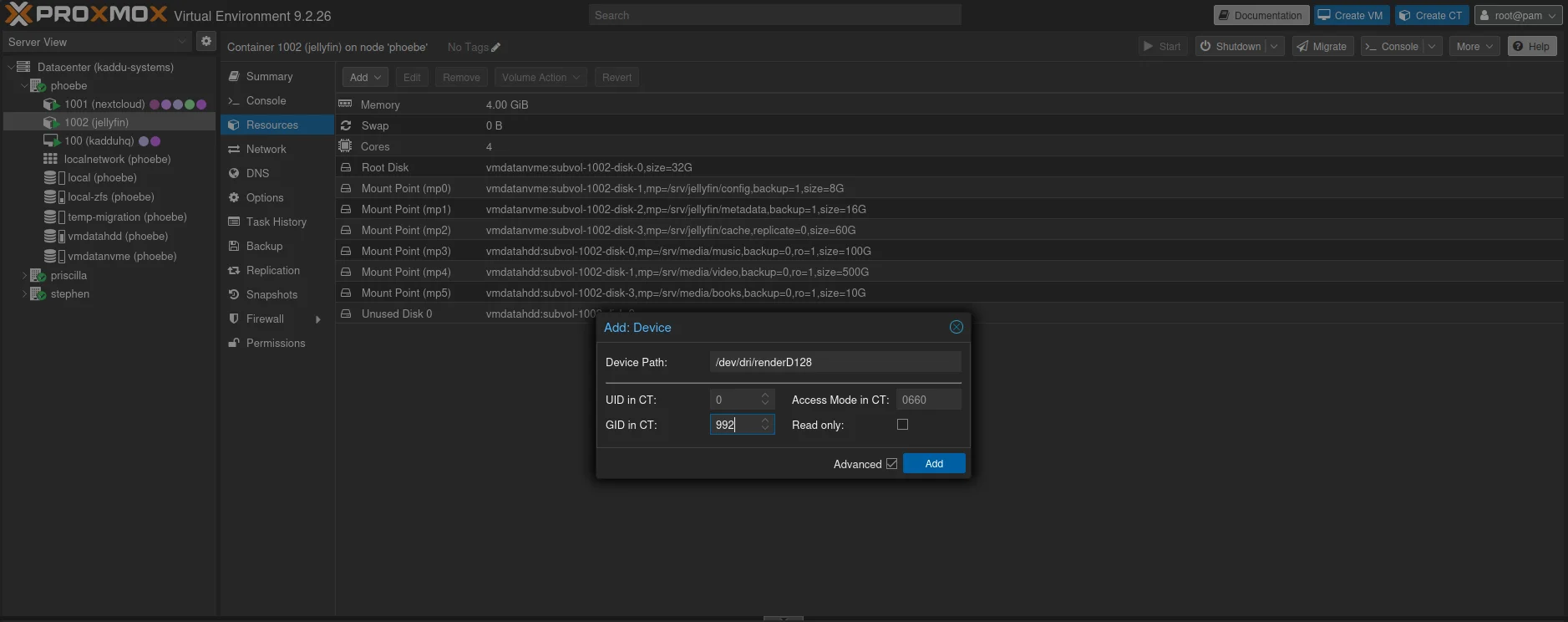
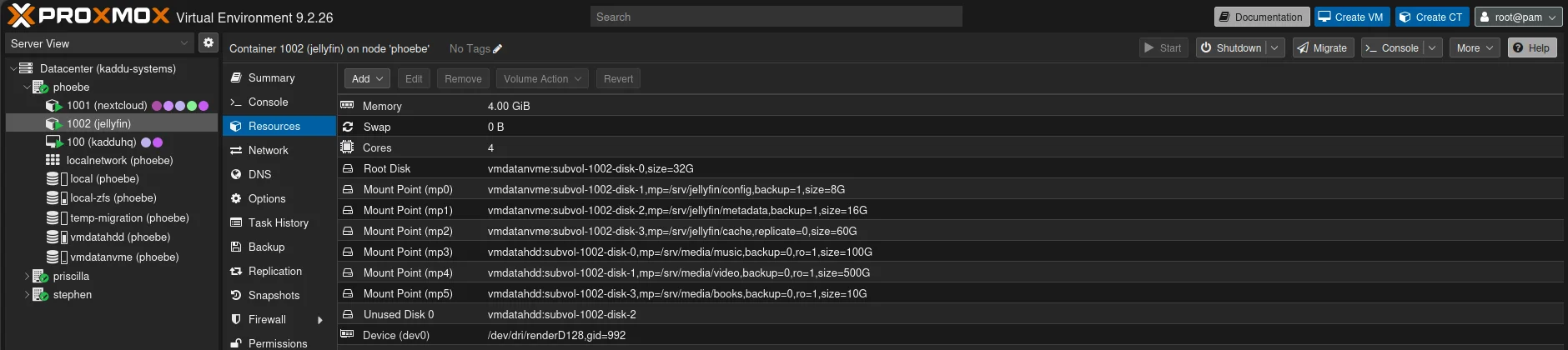
The same thing on the command line is
pct set 1002 -dev0 /dev/dri/renderD128,gid=992. gid is the “Group
ID to be assigned to the device node” [6]. This works in an
unprivileged container, and the older recipes with
lxc.cgroup2.devices.allow lines in the config file aren’t needed any
more. Restart the container and check:
pct reboot 1002
pct exec 1002 -- ls -l /dev/dricrw-rw---- 1 root render 226, 128 Nov 19 16:34 renderD128Step 2: from the container to Docker
Two additions to the compose file from part 1, at the same level as
user::
services:
  jellyfin:
    # ... everything from part 1 stays ...
    group_add:
      - '992'
    devices:
      - /dev/dri/renderD128:/dev/dri/renderD128
devices makes the device visible in the Docker container, and
group_add puts Jellyfin’s user in the group that may use it. Jellyfin’s
own example uses network_mode: host, but that has nothing to do with
the graphics. The bridge network from part 1 works fine.
cd /opt/jellyfin
docker compose up -d
docker compose exec jellyfin iduid=1000 gid=1000 groups=1000,992What can this chip actually do?
Lists of which AMD generation supports which codec are written around
graphics card names, and an APU like this one is easy to misplace in
them. So ask the chip. The Jellyfin image has vainfo built in
[1]:
docker compose exec jellyfin /usr/lib/jellyfin-ffmpeg/vainfo \
  --display drm --device /dev/dri/renderD128
It finds “Mesa Gallium driver 26.0.8 for AMD Radeon Vega 11 Graphics”
and lists what it can do. VLD means decode, EncSlice means encode:
| Codec | Decode | Encode |
|---|---|---|
| H.264 | yes | yes |
| HEVC 8-bit | yes | yes |
HEVC 10-bit (HEVCMain10) | yes | no |
| VP9 8-bit and 10-bit | yes | no |
| MPEG-2, VC-1 | yes | no |
| AV1 | no | no |
I had expected no 10-bit HEVC on a chip this old, and I was wrong. That line is the important one, because 4K HDR films are almost always 10-bit HEVC. It also decides whether the chip can do HDR tone mapping: Jellyfin’s AMD page says hardware tone mapping “is supported on all AMD GPUs that have HEVC 10-bit decoding” [1].
Switching it on in Jellyfin
Dashboard → Playback → Transcoding:
- Hardware acceleration: Video Acceleration API (VAAPI). AMD AMF is in the list too, and I tried it first. Playback simply failed. Jellyfin’s page explains why: on Linux, AMF is “based on their Pro Vulkan and OpenCL stack, which is a closed source solution”, and it’s “Not recommended, limited support, hardware encoder only” [1].
- VA-API Device:
/dev/dri/renderD128. - Enable hardware decoding for: tick what
vainfolisted under decode: H264, HEVC, MPEG2, VC1, VP9, HEVC 10bit, VP9 10bit. Leave VP8, AV1 and the two HEVC RExt boxes unticked. A box ticked for something the chip can’t do makes those files fail instead of falling back to the processor. - Enable hardware encoding: on. I left Allow encoding in HEVC format off: H.264 plays on everything, and Jellyfin’s own ranking puts the encoders of “VCN1/VCE (Raven/Picasso/GCN GPUs)” last for speed and quality [1].
- Enable tone mapping: on. More about that below.
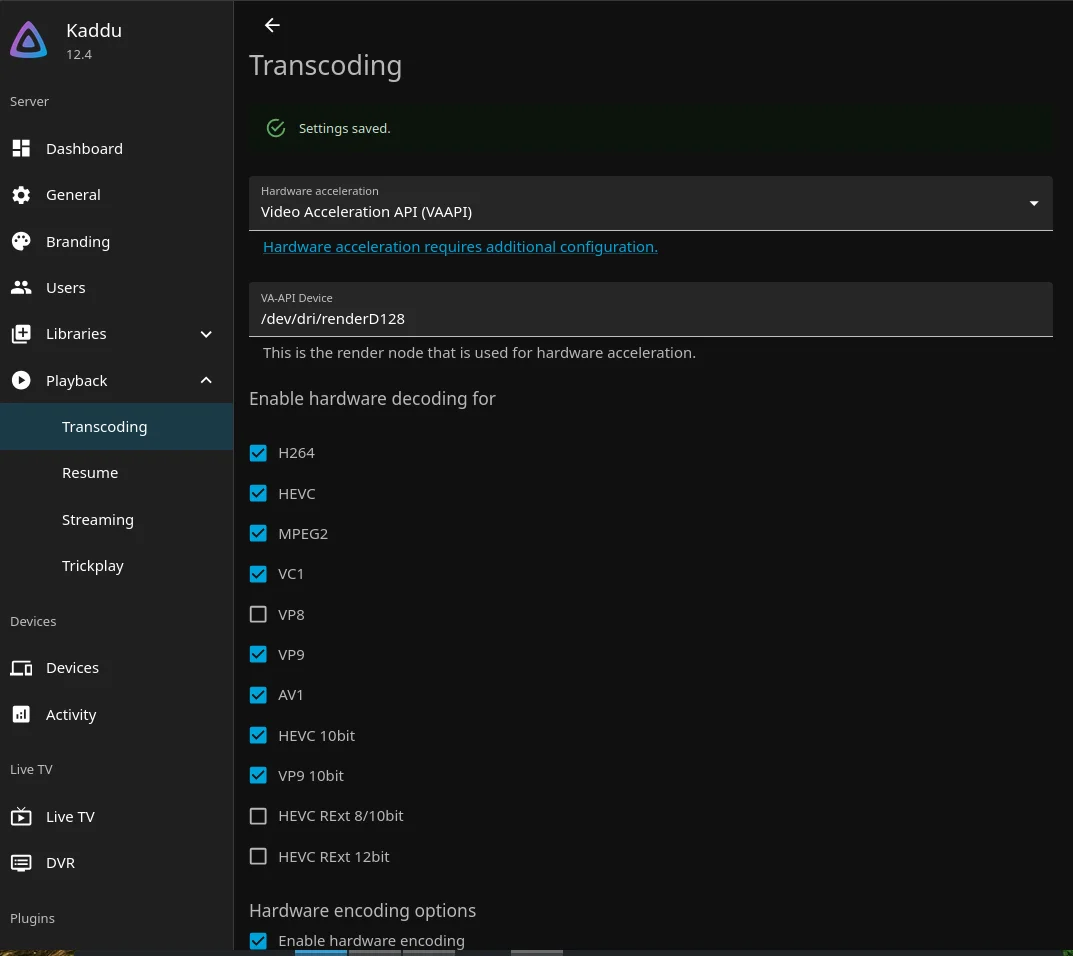
In this screenshot AV1 is still ticked. Untick it: this chip can’t decode AV1.
Then restart Jellyfin. This is the step I didn’t know about, and it cost me half an hour:
cd /opt/jellyfin
docker compose restart jellyfin
Tone mapping, and the restart that makes it work
HDR10 video uses a much wider range of colours and brightness than an ordinary screen. When a browser can’t show HDR, Jellyfin has to squeeze the picture into SDR. That’s tone mapping. Without it, the HDR picture is sent as if it were SDR, and it looks grey, pale and flat. Mine did.
Jellyfin can do the tone mapping on an AMD chip in two ways on Linux: with OpenCL, or with Vulkan. OpenCL on AMD needs AMD’s ROCm runtime, which isn’t in the image. The Vulkan way goes through the same open Mesa driver as VA-API, and Jellyfin’s page lists “ROCm OpenCL runtime is not required” as one of its advantages [1].
My first try with tone mapping on failed with this in the FFmpeg log:
[OpenCL @ 0x7f526a476bc0] Failed to get number of OpenCL platforms: -1001.
Device creation failed: -19.
Failed to set value 'opencl=ocl:0.0' for option 'init_hw_device': No such device
Jellyfin had chosen OpenCL. It checks the graphics device when it starts, and mine had started while hardware acceleration was still set to None, so it never found the Vulkan route. After a restart, the log said:
VAAPI device "/dev/dri/renderD128" is AMD GPU
VAAPI device "/dev/dri/renderD128" supports Vulkan DRM modifier
VAAPI device "/dev/dri/renderD128" supports Vulkan DRM interop
And the same clip played with proper colours. The FFmpeg log shows how:
the frames are decoded and scaled with VA-API (scale_vaapi), handed to
Vulkan without leaving the graphics memory (hwmap), tone mapped there
by libplacebo, and handed back to VA-API for the encode. No OpenCL
anywhere.
You can check this on your own server in the newest FFmpeg log, inside the container:
ls -t /srv/jellyfin/config/log/FFmpeg.Transcode-* | head -1 \
  | xargs grep -o -E "tonemap_[a-z]+|libplacebo|vulkan|scale_vaapi" | sort | uniq -c
libplacebo means Vulkan on the graphics chip. tonemap_opencl means
it is trying OpenCL, and tonemapx means the processor is doing it.
The numbers
I used two of Jellyfin’s own test clips [9], so you can repeat this with the same files:
- Clip A:
Test Jellyfin 1080p AVC 20M, 1080p H.264, 60 fps, 8-bit. - Clip B:
Test Jellyfin 4K HEVC HDR10 40M, 2160p HEVC, 10-bit, HDR10, 60 fps, 39.4 Mbps.
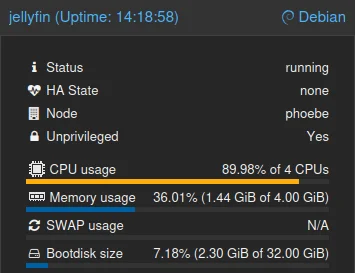
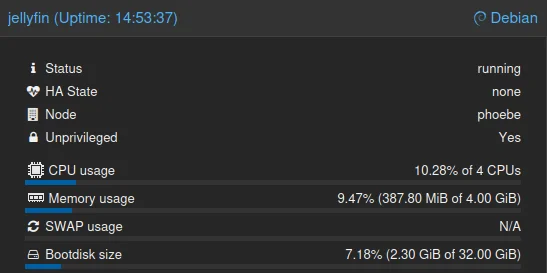
Clip A direct plays in the browser, as shown above, so there’s nothing to measure. Clip B was played in Firefox with the quality set to 720p, so it has to be decoded from 4K HDR, tone mapped and encoded again. The speed comes from the player’s Playback Info, the CPU from the container’s Summary page in Proxmox.
| Clip B, 4K HDR10 to 720p | Speed | CPU (4 cores) | Plays smoothly |
|---|---|---|---|
| Software (acceleration None) | 45 fps, 0.75x | 90% | no |
| VA-API + Vulkan tone mapping | 65 fps, 1.08x | 10% | yes |
The clip runs at 60 frames per second, so anything below 1.0x stutters. In software, all four cores work flat out and still only manage three quarters of real time. With the graphics chip, the server keeps ahead of the player and the processor is nearly idle:
And the two Playback Info windows side by side, software first:
Two things to know when you test this yourself.
Set a bitrate, not just a size. Both runs say “Target codecs H264, 41.3 Mbps”. Lowering only the resolution kept Jellyfin’s bitrate limit at 41 Mbps, and that’s a lot for a phone on mobile data. I tested from a train, and the VA-API run still paused now and then. The server was keeping up, the connection wasn’t. In the player, pick a quality with a bitrate, such as 720p at 4 Mbps.
1.08x isn’t much room. For one viewer it’s fine. Two people transcoding 4K HDR at the same time would probably be too much for this chip. Ordinary 1080p transcodes are far lighter.
If a 4K film is still too heavy, there are two ways out without new hardware. Play it on something that can take the file as it is, like the TV above. Or keep a 1080p version next to it, as in part 2, and let the phones use that.
What’s next
The server can now feed anything in the house. In part 4 the clients get their turn: the apps, the users, and watching from outside the house.
phoebe isn’t the only machine that could do this. priscilla, the other Tiny, has a 7th-gen Intel Core i5 with Intel’s Quick Sync video engine, which works differently, and the results may well differ too. priscilla is reserved for Immich, but a test Jellyfin on it is quick to set up, so I’ll run the same two clips there and add the results to this post.
Sources
- Jellyfin: AMD hardware acceleration: VA-API vs. AMF on Linux, the codec support by generation, the OpenCL and Vulkan tone mapping methods,
vainfo, pulled 2026-11-20 - Jellyfin: hardware acceleration overview: when hardware acceleration helps and which vendors are supported, pulled 2026-10-05
- Jellyfin: transcoding: why and when Jellyfin transcodes, pulled 2026-10-05
- Jellyfin: codec support: which clients play which codecs directly, pulled 2026-10-05
- Video Core Next (Wikipedia): AMD’s video engine generations, pulled 2026-10-05
- pct.conf (Proxmox VE docs): the container config reference, including the
devNpassthrough entry, pulled 2026-10-05 - radeontop (GitHub): watching the AMD graphics chip’s engines, pulled 2026-10-05
- amdgpu_top (GitHub): a newer AMD monitor that also shows the video engines, pulled 2026-10-05
- Jellyfin test videos: the two test clips, “courtesy of Gnattu” and licensed CC BY-SA 4.0, pulled 2026-11-19