Most posts about backup explain the 3-2-1 rule and then show a setup that follows it. I can’t write that post yet. What I can do is go through the rule, hold my own homelab up against it, and show where it falls short today.
The 3-2-1 rule, briefly
Backblaze puts the rule in one sentence: “keep three copies of your data on two different media with one copy off-site” [1]. The three copies include the original, so it is the data you work on plus two more [1]. “Two different media” comes from the time of tape and CDs. Today Backblaze reads it as two different devices [1]. Off-site means a place that a fire, a burglary or a lightning strike at home doesn’t reach.
The numbers answer different accidents. The extra copies are for the drive that dies. The second device is for the machine that takes all its drives with it. The off-site copy is for the house.
Beyond 3-2-1: an offline copy and tested restores
A newer version of the rule is called 3-2-1-1-0. It adds one copy that is “offline or air gapped”, and zero errors, which means backups that are checked and restores that have been tried [2].
The offline copy is there because of ransomware. The American cybersecurity agency CISA explains why: “many ransomware variants attempt to find and subsequently delete or encrypt accessible backups to make restoration impossible unless the ransom is paid” [3]. A backup server that is always on and always reachable from the other machines is accessible in that sense.
This is also why backups are often “pulled” by the backup server from the origin. That way a compromised origin server doesn’t give access to the backup server. The origin server does not hold an access key to the backup server. It only holds the backup server’s public key, which the backup server authenticates with.
What I actually need to protect
I have two kinds of data, on two machines.
phoebe is my main Proxmox server. It runs my containers and virtual machines, Nextcloud among them, and all of it is on a single NVMe drive.
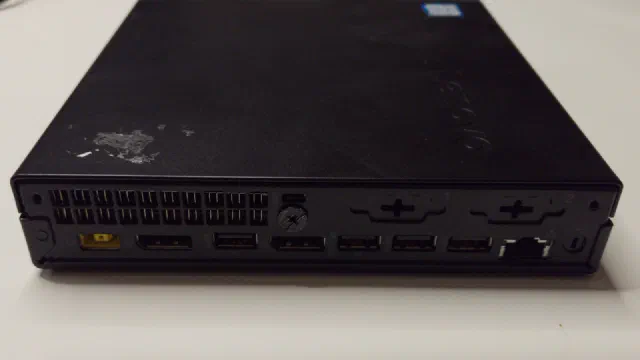
stephen is the backup server. It has six hard drives in a ZFS RAIDZ2 pool, which means any two of them can fail without data being lost. But stephen also holds data that lives nowhere else: our photos (about 1.5 TB), the home directories from our computers (about 2 TB), our home videos and my e-books. The films and TV shows are on it too, a good 3 TB, but most of those can be found again, so I don’t count them here.
So stephen is a backup server and a file server at the same time, and that turns out to matter. And to meet the objection “but it can lose two disks”: RAID is not a backup. RAID is there for reliability. It keeps the storage online when the inevitable happens and a drive has errors or dies outright.
Copy one and two: local backups
ZFS snapshots and replication
Both machines use ZFS, and my backups today are built on that. Both run Jim Salter’s sanoid and syncoid tools [4]. Sanoid is a snapshot manager. On ZFS you can create almost as many snapshots as you like without them slowing your system down much or taking up more space than absolutely necessary. And a snapshot is virtually instant to create. A snapshot is just what it sounds like: a freeze frame of the state of that dataset at the time it was created. ZFS is a copy-on-write (CoW) file system, where any change to a file or file system is written to a new block rather than in place. That allows the file system to keep track of which blocks have changed since any given snapshot. Sanoid handles the creation and pruning of automated snapshots at defined intervals.
Syncoid is then run regularly to replicate these snapshots from source to target. Sanoid and syncoid use the ZFS snapshot, send and receive commands to manage and replicate disk data from source to target.
This way stephen pulls the latest snapshots from the origin server, currently just phoebe, once an hour over SSH [4]. stephen logs in to phoebe and fetches everything that has changed since the last time. Only the changed blocks travel, so it works fine over the PowerLine connection between the two. This even works if stephen missed the pull an hour ago, for example because it was switched off. Syncoid creates a snapshot marker on both source and target, and the next time it calls on the source dataset it creates a new snapshot and starts transferring everything from the old to the new one. When done, it destroys the old syncoid snapshot.
The way I have set up my origin server versus stephen as my backup server is that on the origin server a new snapshot is created every 15 minutes. If I had to live up to shorter RTO/RPO demands, I could create a snapshot every 5 or 3 minutes. Then another set of snapshots is taken every hour, day, week, month and year.
Sanoid on the source versus the target server then has two different rules (at least in my setup). As I have limited storage in the production server, I create fairly frequent snapshots (every 15 minutes as stated earlier), hourly, daily, weekly, monthly, and yearly. But sanoid keeps the number of snapshots down to an operational minimum and prunes the older snapshots more aggressively than on the backup server.
On the backup server no snapshots are created automatically apart from the syncoid ones, and the automatic pruning keeps more of each type for longer.
This way the production server can be kept small and nimble while the backup server can hold more snapshots and thus changes.
My second Proxmox server will get the same configuration when it goes into use: the same two sets of rules, pointed at its own datasets.
The pull has a price that is easy to overlook. phoebe has no login on stephen, but stephen logs in to phoebe as root. So the backup server is the machine that has to be guarded best.
A snapshot alone is not a backup. It sits on the same drive as the data, and on phoebe that is one NVMe drive: if it dies, the snapshots die with it. What snapshots are good for is the file I deleted or overwrote yesterday. It is the copy on stephen that makes it a backup.
vzdump and Proxmox Backup Server
What I don’t have yet is Proxmox’s own kind of backup. The built-in tool, vzdump, makes a backup of one guest at a time, and “Proxmox VE backups are always full backups - containing the VM/CT configuration and all data” [5]. Proxmox Backup Server improves on that: it stores backups as deduplicated chunks, so a new backup only takes the space of what has changed [5], and it can check the stored backups against their checksums on a schedule [6].
Whether I will run Proxmox Backup Server on stephen, next to what is there today, I have not decided. There are two things that speak for it. The first is that the two are good at different things. Replication gives me a copy of the datasets, and to restore from it I need to know which datasets belong to which guest and what its configuration was. A backup of a guest is one item in a list that I restore with a few clicks, to any Proxmox server. The second is that it would be a second method that shares nothing with ZFS replication. More on that further down.
What speaks against it is that it is one more service to install, learn and keep updated, on a machine whose job I would like to keep simple. Plain vzdump backups to a share on stephen would give me the guest-by-guest restore with less to look after, at the price of every backup being a full one.
The step-by-step version of this belongs in the Proxmox from scratch series, which started with setting up the server; backups get a part of their own.
Retention and pruning
How long to keep old backups is a choice between disk space and how far back I can go. Proxmox’s own advice is to err on the long side: “We recommend that you use a higher retention period than is minimally required by your environment; you can always reduce it if you find it is unnecessarily high, but you cannot recreate backups once they have been removed” [5].
My sanoid configuration has two policies, one for the datasets in daily use and one for the copies on the backup server:
| Snapshots kept | In daily use | Backup copies |
|---|---|---|
| Every 15 minutes | 24 (6 hours) | 96 (a day) |
| Hourly | 72 (3 days) | 192 (8 days) |
| Daily | 90 | 183 (half a year) |
| Weekly | 17 (about 4 months) | 52 |
| Monthly | 12 | 24 |
| Yearly | 2 | 5 |
The backup side keeps more of everything. The server in daily use has one small, fast drive, and stephen has the space. It also means that a snapshot I have already pruned on phoebe can still be found on stephen.
Counting my copies
Here is my setup held up against the rule.
| Data | Copies | Devices | Off-site |
|---|---|---|---|
| Containers and virtual machines (on phoebe) | 2: phoebe and stephen | 2 | none |
| Photos, home directories, home videos (on stephen) | 1 | 1 | none |
The second row is the uncomfortable one. Six drives in RAIDZ2 feel like a lot of safety, but they are one copy on one machine. RAIDZ2 covers a drive that fails. It doesn’t cover a mistake, a fire, or me.
I got a reminder of that this month, and it is not over as I write.
At the start of October ZFS took one of the six drives out of service after a run of errors, so the pool was down to one drive of safety margin. A few days later I bumped the cables while fitting a side panel. Two more drives lost contact, and ZFS suspended the whole pool. It came back about twenty minutes later with no known data errors.
Then I took the drives out to mount them properly. When I started the machine again the pool would not import, and I had to use the recovery option that rolls a pool back to its last consistent state. That cost about a minute of writes. For a night it ran on four of the six drives, which in a RAIDZ2 means no safety margin at all, while it rebuilt onto a spare drive. The rebuild took ten hours.
Today the rebuild is done, a full check of the pool has found no data errors, and as far as ZFS can tell nothing has been lost. But one drive still drops out under load, and I am back on one drive of margin. Through all of it, the only copy of our photos has been on that pool.
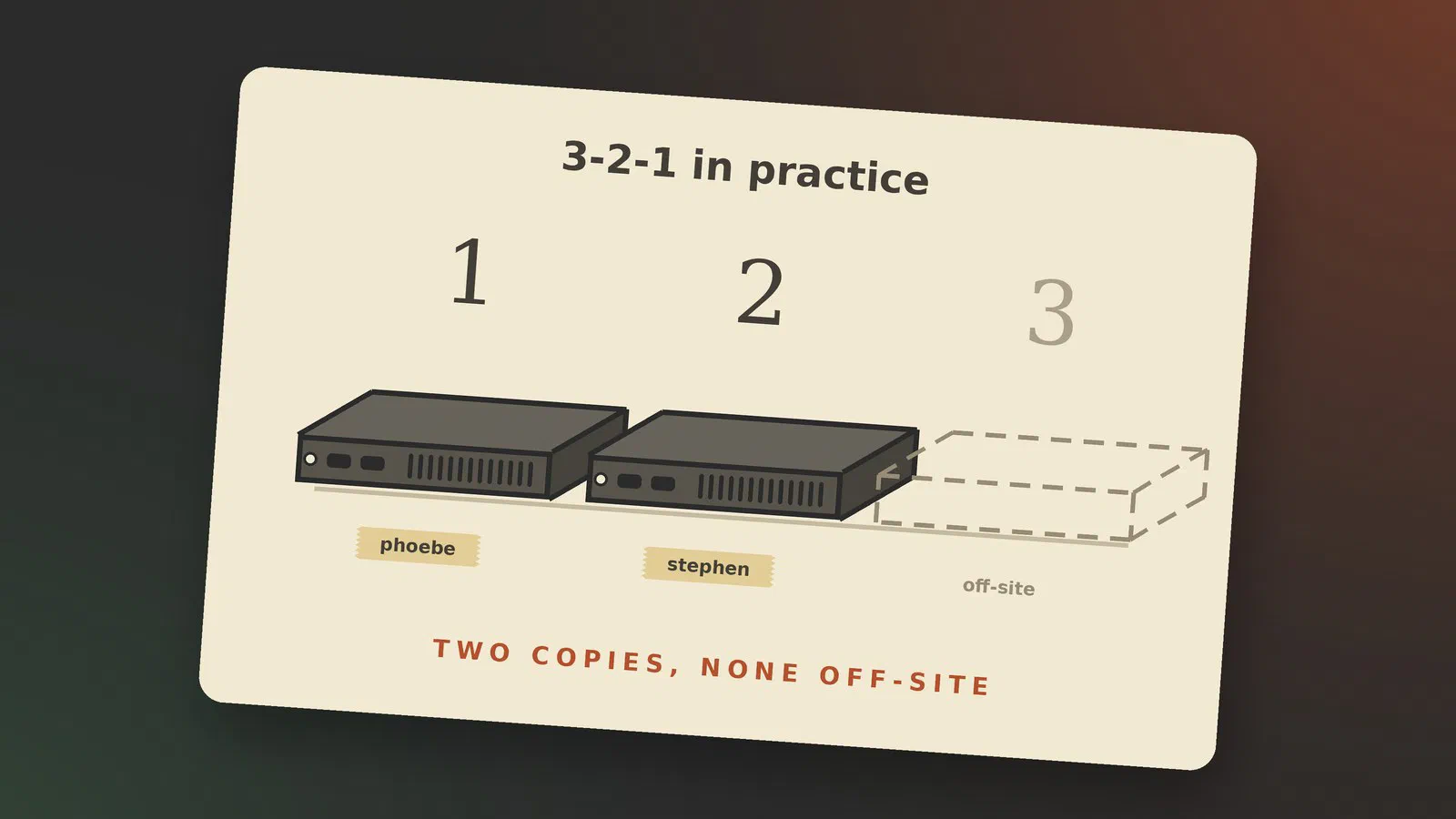
So for the containers and virtual machines I am at 2-2-0, and for the photos, the home directories and the home videos at 1-1-0.
Copy three: getting a copy off-site
I have no copy outside the house today. These are the ways I can see to get one.
A different method, too
Some readings of the rule take the 2 one step further: two different methods as well as two different devices. I think they are right.
My local copy is made with ZFS send and receive. If the copy outside the house is made the same way, an error or a weakness in that one mechanism most likely ends up in both, and I could be left with two dead copies. It is not only a thought experiment. For several years OpenZFS had bugs where native encryption combined with snapshots and send and receive could corrupt data, and fixes for at least two of them only came with versions 2.2.8 and 2.3.3 in 2025 [7].
So whatever carries the third copy should work in another way than the second: Proxmox Backup Server with its own format, or plain files copied to a drive.
PBS remotes and sync jobs
If I do end up with Proxmox Backup Server, it has its own answer. It can copy a whole datastore to a second Proxmox Backup Server with a sync job [8]. By default a backup that is deleted on the first server stays on the second; removing it there too is an option that has to be switched on [8]. It is the tidy solution, and it needs a second machine at another address, with someone willing to give it power and a network connection.
Cloud or a friend’s house
I see three ways to keep a copy somewhere else that is updated over the internet.
Backblaze. Cloud storage paid for by the amount stored. Their B2 service costs 6.95 US dollars per TB a month [9]. What I need to protect, the photos, the home directories and the home videos, is between three and four TB, so that is somewhere between 20 and 30 dollars a month. It stores files and knows nothing about ZFS, so it takes another tool than the rest of my setup. After the section above I count that in its favour.
zfs.rent. A small company that hosts a hard drive you send them. The drive sits in a datacenter, attached to a virtual machine that is yours, for 20 US dollars a month per drive whatever its size [10]. ZFS replication could then go to it the same way it goes to stephen today. That is convenient, and it is also the same method once more.
On price it wins sooner than I expected. From about 3 TB it is cheaper by the month than Backblaze, and it stays at 20 dollars however full the drive gets, where Backblaze grows with every TB. The drive itself comes on top, once.
Their postal address is in California [10], so I would have a drive delivered to them from an American shop instead of posting one from Denmark. And for family photos on a drive in another country I would want encryption. ZFS has an answer for that. An encrypted dataset can be sent exactly as it lies on the disk, and the copy “may then be received on an untrusted machine since that machine will not have the encryption keys to read the protected data or alter it without being detected” [11]. The data is then unreadable both on the way and on the drive, and the key never leaves my house. Two things hold me back. It only works for datasets that are encrypted to begin with. And encryption combined with send and receive is the very corner of ZFS where the bugs I mentioned above were found.
A box at a family member’s or a friend’s house. A small machine with a drive in it, at an address I trust. There is no monthly bill, and I can return the favour by keeping their copy at mine.
All three are updated as things change, so the copy outside the house is hours old and not weeks. All three also need a good internet connection, and the last one needs it at both ends. The first upload of several TB takes days on a home line whichever I choose.
The low-tech version is a hard drive that I carry to another address and swap for its twin now and then. It is only as fresh as my last visit. For photos that is good enough, because a photo doesn’t change after it has been taken.
Ransomware and the offline copy
CISA’s advice is short: “Maintain offline, encrypted backups of critical data, and regularly test the availability and integrity of backups in a disaster recovery scenario” [3].
For the data that only exists on stephen, the offline copy comes first, before anything else in this post. The plan is ordinary 3.5" hard drives that I already have: the photos on one, my folder of old backups on another, and the rest on a pair of smaller drives that mirror each other. A drive is connected while the copy runs and is otherwise unplugged and kept away from the server. Every drive gets tested before I trust it with anything.
If one set of those drives is kept at another address, the same drives are also my off-site copy. That is the cheapest way I know to cover two of the numbers at once.
Proxmox Backup Server has the same idea built in for guest backups. A removable datastore sits on a drive that can be unmounted and taken away [12].
Testing restores
This is the zero in 3-2-1-1-0, and the part that is easiest to put off.
Verification jobs
Checking that the stored data can still be read is the easy half. On ZFS that is a scrub, which reads every block and compares it with its checksum. stephen runs one every month.
Proxmox Backup Server has verification jobs for the same purpose, and its documentation says: “It is recommended that you reverify all backups at least monthly, even if a previous verification was successful” [6]. It also warns against stopping there, and calls verification “an additional, but not a sufficient protection measure” [12].
Actually restoring a VM
A backup that passes its checks can still be useless, if what was backed up was already broken or something was left out. The only way to find out is to restore it and start it. The Proxmox Backup Server documentation recommends doing that often, and adds a point that is easy to miss: “Make sure to restore to a new guest and not to overwrite your current guest” [12].
Until now I had nowhere to restore to, because phoebe was my only hypervisor. With a second one in the house I do. The test I have in mind is to take last night’s copy of the Nextcloud container from stephen, bring it up on the second server with the network unplugged, and see if I can log in and open a file.
What it costs me
So far, very little money. stephen is a friend’s old gaming PC, and its drives have been collected over several years. The offline copies go on drives I already own.
What is missing will cost something. An off-site copy is either a subscription, in the region of 20 to 30 dollars a month with Backblaze or zfs.rent for what I need to protect [9] [10], or a small machine and a drive at someone’s house, plus the favour. Proxmox Backup Server, if I go that way, is free to use, but it is one more thing to keep updated.
Where that leaves me
In the order I plan to do it:
- Make the offline copies of the photos and home directories.
- Get stephen’s pool stable, with all six drives in and staying in.
- Move one set of the offline drives to another address.
- Decide between Proxmox Backup Server and plain vzdump backups for the guests, and set one of them up on stephen.
- Put a restore test in the calendar and do it.
Sources
- The 3-2-1 Backup Strategy (Backblaze), pulled 2026-10-09
- What’s the Diff: 3-2-1 vs. 3-2-1-1-0 vs. 4-3-2 (Backblaze), pulled 2026-10-09
- #StopRansomware Guide (CISA), pulled 2026-10-09
- sanoid and syncoid (GitHub, jimsalterjrs), pulled 2026-10-09
- Backup and Restore (Proxmox VE 9.2 documentation), pulled 2026-10-09
- Maintenance Tasks (Proxmox Backup Server 4.2 documentation), pulled 2026-10-09
- Proposal: Consider adding warnings against using zfs native encryption along with send/recv in production (OpenZFS documentation issue 494, GitHub), pulled 2026-10-09
- Managing Remotes & Sync (Proxmox Backup Server 4.2 documentation), pulled 2026-10-09
- Cloud Storage Pricing (Backblaze), pulled 2026-10-12
- zfs.rent, pulled 2026-10-12
- zfs-send(8) (OpenZFS documentation), pulled 2026-10-12
- Backup Storage (Proxmox Backup Server 4.2 documentation), pulled 2026-10-09